This post contains affiliate links. As an Amazon Associate, solveyourtech.com earns from qualifying purchases, at no extra cost to you.
Netflix streaming works by sending video to your device over the internet as you watch it, so nothing has to be downloaded or stored first. You pay a monthly fee for a plan, sign in to the Netflix app or website on a TV, phone, tablet, computer, or streaming device, and press play on any movie or show in the catalog.
Plan details and prices come from Netflix’s plans and pricing page, which is the place to check if you’re reading this after another price change.
What Happens When You Press Play
When you pick a title, the Netflix app asks Netflix’s servers for the video and starts playing the first few seconds while the rest keeps arriving in the background. Most of that video doesn’t travel across the country. Netflix runs its own delivery network, called Open Connect, and places storage servers inside or next to internet providers’ networks. Popular shows are copied to those servers overnight, so your stream usually comes from a machine that’s close to you.
Netflix also adjusts the picture quality while you watch. Each title is stored at several quality levels, and the app keeps checking how fast your connection is. If your Wi-Fi slows down because someone starts a big download, the picture may get a bit softer for a few seconds instead of stopping to buffer. When the connection recovers, the quality climbs back up. That’s why a show can look blurry for the first moment and then sharpen.
What You Need to Stream Netflix
You need three things: a paid Netflix plan, an internet connection, and a device with the Netflix app or a supported web browser.
Internet Speed
Any home broadband connection from a cable, fiber, DSL, 5G home internet, or modern satellite provider is usually enough. Netflix recommends these minimum speeds for one stream:
| Video quality | Recommended speed |
|---|---|
| HD (720p) | 3 Mbps or higher |
| Full HD (1080p) | 5 Mbps or higher |
| Ultra HD (4K) | 15 Mbps or higher |
Those numbers are per stream. If two people in your home watch at the same time, add their speeds together. You can test your connection at Fast.com, a speed test that Netflix runs. On a TV, open the Netflix app’s Get Help menu and choose Check your Network. These speeds come from Netflix’s internet speed recommendations page.
You can also stream over a phone’s cellular connection, but it uses a lot of data. Netflix estimates about 3 GB per hour for HD video. The Netflix app has data-saving options for cellular use, explained in the Save Data and Maximum Data settings in the Netflix iPhone app.
A Device That Runs Netflix
Netflix works on almost every screen you’re likely to own:
- Smart TVs: Most current Samsung, LG, Sony, Vizio, TCL, Hisense, and Google TV or Roku TV models have Netflix built in. Many remotes have a Netflix button.
- Streaming devices: A Roku, Amazon Fire TV Stick, Apple TV, or Google TV Streamer adds Netflix to a TV that doesn’t have it.
- Game consoles: PlayStation and Xbox consoles have a Netflix app.
- Phones and tablets: The free Netflix app is in the App Store for iPhone and iPad and in Google Play for Android.
- Computers: On Windows 10 or 11, a Mac, or a Chromebook, you can watch at netflix.com in a current version of Chrome, Edge, Firefox, Safari, or Opera.
If you only want to get Netflix onto a TV for the lowest cost, the cheapest way to watch Netflix on a TV compares the options.
Netflix Plans and Prices in the US
These are the three plans available to new and existing US members, from Netflix’s plans and pricing page:
| Plan | Price per month | Ads | Screens at once | Best video quality | Download devices |
|---|---|---|---|---|---|
| Standard with ads | $8.99 | Yes | 2 | 1080p (Full HD) | 2 |
| Standard | $19.99 | No | 2 | 1080p (Full HD) | 2 |
| Premium | $26.99 | No | 4 | 4K (Ultra HD) with HDR | 6 |

Taxes may be added depending on where you live. The old Basic plan is discontinued, and Netflix doesn’t offer a free trial in the US. You can change plans or cancel online at any time.
If Apple bills you for Netflix, cancel it in your Apple subscriptions instead, using the steps to cancel subscriptions on iPhone.
A few differences matter more than the price:
- Standard with ads shows ad breaks before and during most shows and movies. A small number of titles aren’t available on this plan and show a lock icon. Downloads are limited to 15 per device per month.
- Standard removes the ads and lets you add one extra member (more on that below).
- Premium is the only plan with 4K and HDR video and Netflix spatial audio. It only makes sense if you have a 4K TV and an internet connection of at least 15 Mbps.
If you’re signing up from an iPhone, how much Netflix costs on the iPhone explains how billing works through the app.
How Many Devices Can Stream at Once?
There’s no limit on how many devices you can sign in to. The limit is on how many can play video at the same moment: two on either Standard plan and four on Premium. If you try to start one more stream, Netflix shows a message that your account is being used on too many devices, and you’ll need to stop playback somewhere else first.
If an old phone is still signed in, here is how to log out of the Netflix app on an iPhone.
Each account can have up to five profiles. Profiles keep each person’s watch history, recommendations, and My List separate, but they don’t add extra streams.
If you’re at the limit, you can delete a Netflix profile that nobody uses anymore to make room.
The Netflix Household Rule
Netflix accounts are meant for one household. Netflix defines your household as the devices that connect to the internet at the main place where you watch on a TV. Phones, tablets, and laptops that belong to people in your home can still watch when they’re away.
To share with someone who doesn’t live with you, the account owner can buy an extra member slot on the Standard or Premium plan. It costs $7.99 per month with ads or $9.99 per month without ads. Standard allows one extra member and Premium allows two. The extra member gets their own sign-in and one profile, and the account owner pays. Extra members aren’t available on the Standard with ads plan.
How to Start Streaming Netflix on an iPhone
These steps use the current Netflix app on an iPhone running iOS 26. The Android app has the same layout. Haven’t installed the app yet? Start by setting up Netflix on an iPhone.
- Open the Netflix app and sign in with the email address or phone number and password on your account. A screen titled Who’s watching? appears.
- Tap your profile. The Home screen opens, with rows of shows and movies.
- Scroll through the rows, or tap the Search icon (the magnifying glass) at the top right and type a title, actor, or genre.
- Tap a title to open its details page, then tap Play. For a series, Netflix starts the next episode you haven’t watched.
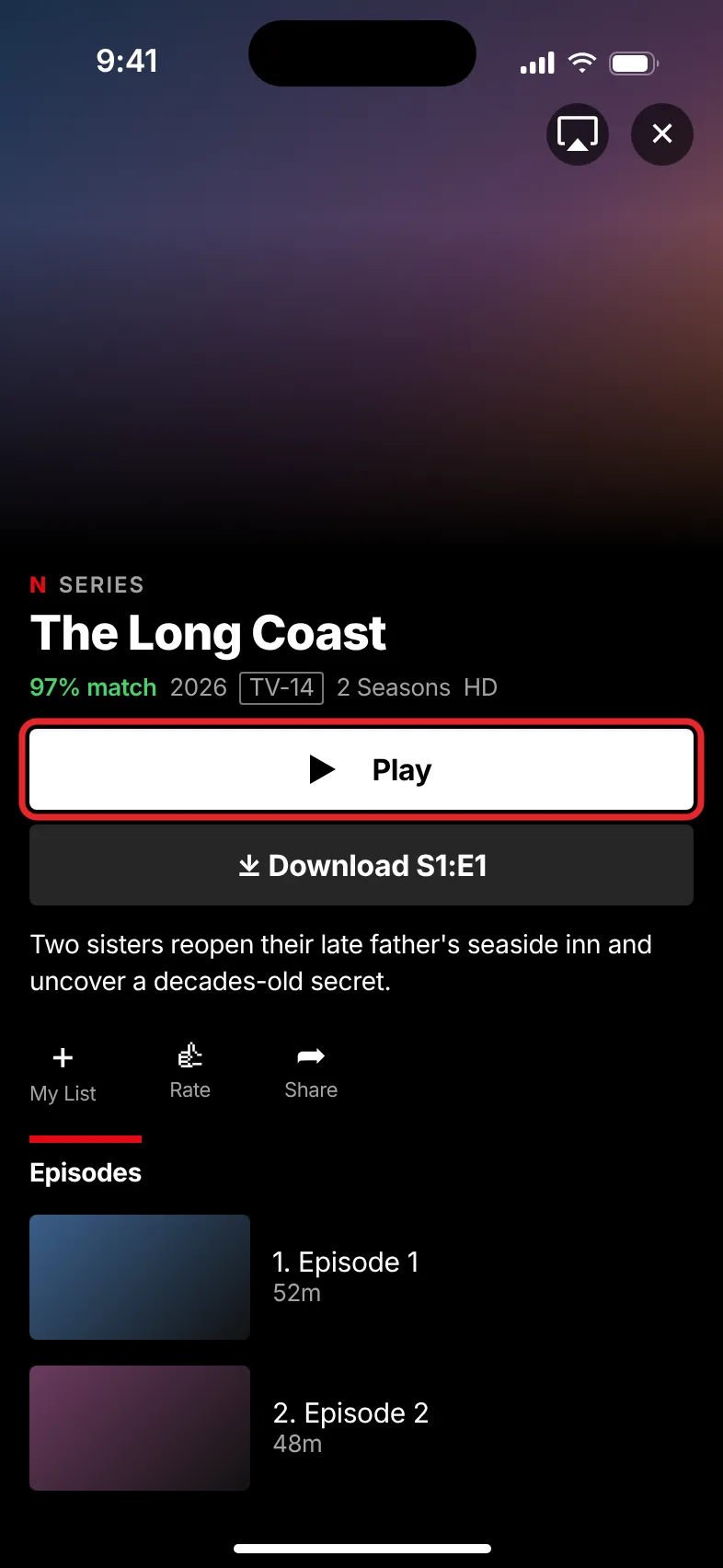
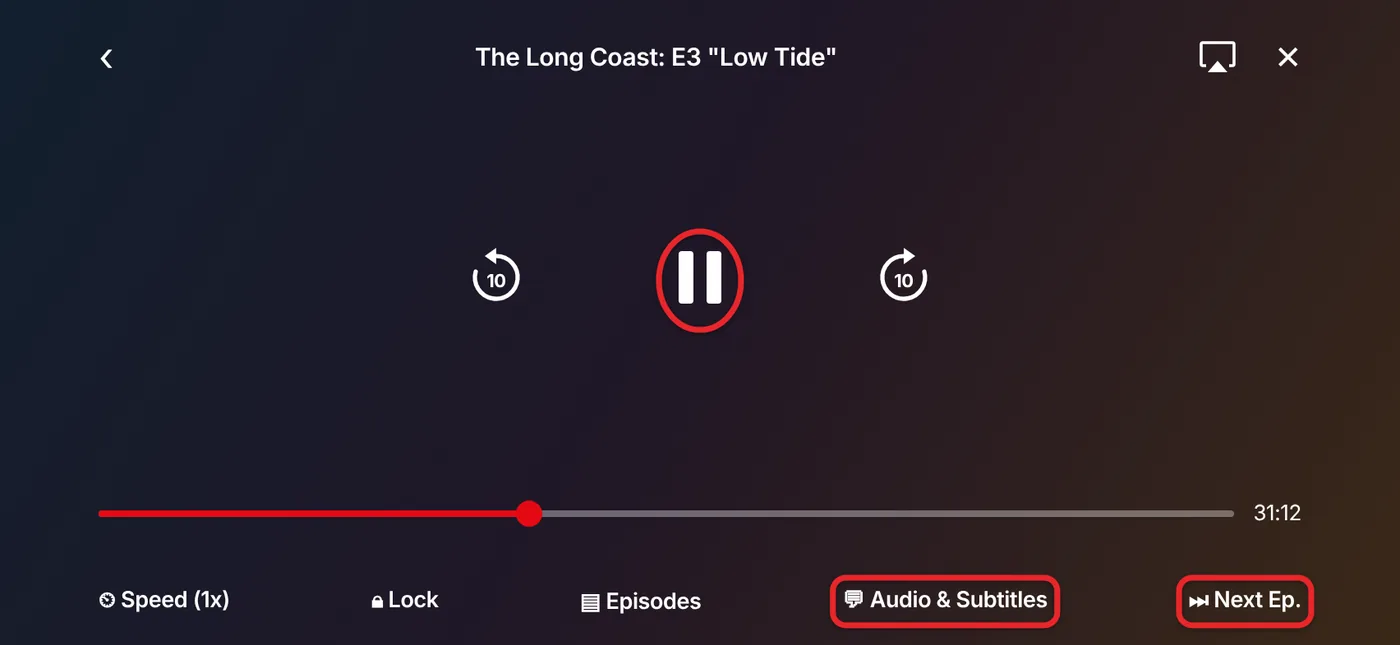
- The video starts playing. Turn your iPhone sideways for a full-screen picture.
- Tap the screen to show the playback controls. You can pause, skip back or ahead 10 seconds, change subtitles and audio under Audio & Subtitles, or tap Next Episode.
When you stop watching, Netflix saves your place. The title shows up in a Continue Watching row on any device signed in to the same profile.
On a tablet, watching Netflix on iPad covers the app requirements and offline downloads.
On a TV or Streaming Device
The process is the same on a TV. Open the Netflix app, choose Sign In, and either enter your email and password with the remote or scan the QR code with your phone to sign in from there. Pick your profile, find a title, and press play. On a TV, the search option is in the menu along the left side or top of the screen.
Troubleshooting Netflix Streaming
- The video keeps buffering or looks blurry. Run Check your Network or Fast.com. Move closer to your router, or use a wired Ethernet connection for a TV or console. Restarting your modem, router, and device fixes many slowdowns. If speeds are consistently below what you pay for, contact your internet provider.
- “Too many people” or “too many devices” message. Your plan’s screen limit is in use. Stop playback on another device, or sign out of devices you don’t recognize at netflix.com/manageaccountaccess. Upgrading to Premium raises the limit to four.
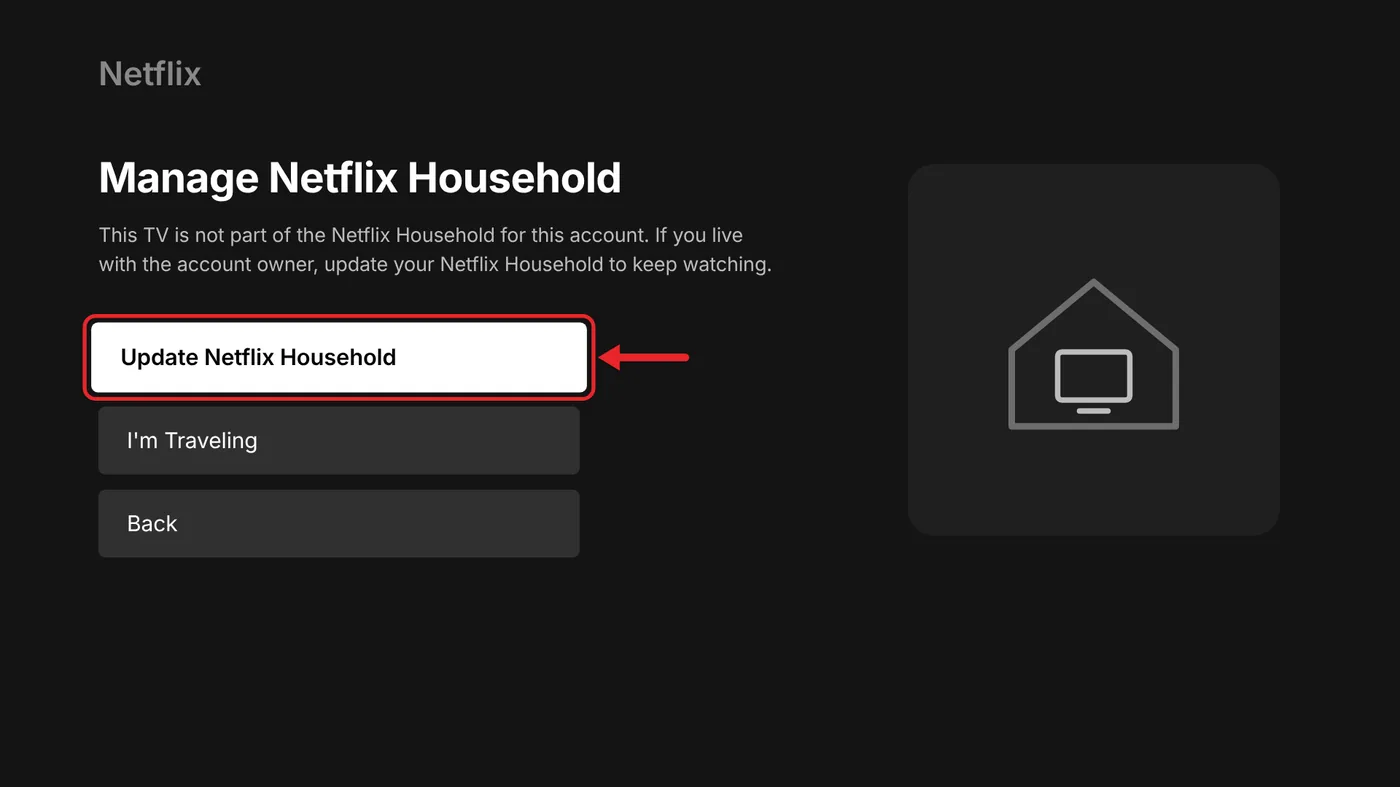
- Your TV says it isn’t part of your Netflix Household. On the TV, press back to open the Netflix menu, then go to Get Help or Settings > Manage Netflix Household > Update Netflix Household > Send Email. Open the email within 15 minutes and select Yes, This Was Me, then Confirm Update. Do this while the TV is on your home Wi-Fi.
- A title has a lock icon. You’re on Standard with ads, and that title isn’t included. Switching to an ad-free plan unlocks it.
- The picture isn’t in 4K on your 4K TV. You need the Premium plan, a 4K-capable device and app, a title that’s available in 4K, and at least 15 Mbps.
- Netflix won’t play in a web browser. Update the browser and your computer’s operating system. Netflix requires fairly recent browser versions and Windows 10 or later.
Netflix Plan and Device Questions
Is there a free trial of Netflix?
Not in the US. Netflix stopped offering free trials here years ago. Netflix has been testing trials in some other countries in 2026, but the US isn’t included. The cheapest way to try it is one month of Standard with ads, which you can cancel online at any time.
Can I watch Netflix without an internet connection?
Only if you download titles first. The Netflix app for iPhone, iPad, and Android can save many shows and movies for offline viewing. Downloads expire after a set time, and they’re deleted if you cancel your membership. You can’t download on a smart TV, streaming stick, or in a web browser.
Downloading Netflix episodes on iPhone or iPad walks through the steps and the download limits for each plan.
How much data does Netflix use?
Netflix estimates up to about 0.3 GB per hour on its lowest setting, 1 GB per hour in standard definition, 3 GB per hour in HD, and 7 GB per hour in 4K. On a phone, set Cellular Data Usage to Save Data or Wi-Fi Only if your data plan is limited.
Can I install Netflix on more devices than my plan allows?
Yes. You can sign in on as many devices as you like. The plan limit only controls how many of them can play video at the same time.
Do I need cable TV to get Netflix?
No. Netflix is a separate subscription that only needs an internet connection. Some cable, phone, and internet providers bundle Netflix into their packages, but you don’t need any of them to sign up.

Matthew Burleigh is the founder, head writer, and editor of Solve Your Tech, which he launched in 2012. He has written technology tutorials since 2008 and worked in IT since 2003, including small-business support, IT management, and consulting. He holds Bachelor’s and Master’s degrees in Computer Science from Arizona State University.
Matthew writes practical guides for Windows, iPhone and iPad, Microsoft Office, Outlook, Google apps, and Android. Solve Your Tech’s guides are checked step by step against the device or app maker’s own documentation and tested on his own devices whenever he has the hardware or software, with clear steps, sources, and update dates.
Read more about Matthew and how Solve Your Tech writes and updates its guides, or report a correction.