This post contains affiliate links. As an Amazon Associate, solveyourtech.com earns from qualifying purchases, at no extra cost to you.
Netflix costs the same on an iPhone as it does everywhere else: $8.99 a month for Standard with ads, $19.99 for Standard, or $26.99 for Premium in the US. The Netflix app is free in the App Store, and one membership covers your iPhone, iPad, TV, and computer, so there’s no separate iPhone charge.
This covers US Netflix plans and the Netflix app on an iPhone running iOS 27. The same steps work on iOS 18 and later, which is the oldest version the current Netflix app supports. Prices can change and differ by country, so check Netflix’s plans and pricing page for the latest numbers where you live.
Netflix Prices for iPhone Users
These are the US prices from Netflix’s plans and pricing page, checked October 18, 2026. Depending on where you live, taxes may be added on top.
| Plan | Price per month | Ads | Screens at once | Best quality | Download devices |
|---|---|---|---|---|---|
| Standard with ads | $8.99 | Yes | 2 | 1080p | 2 |
| Standard | $19.99 | No | 2 | 1080p | 2 |
| Premium | $26.99 | No | 4 | 4K with HDR | 6 |
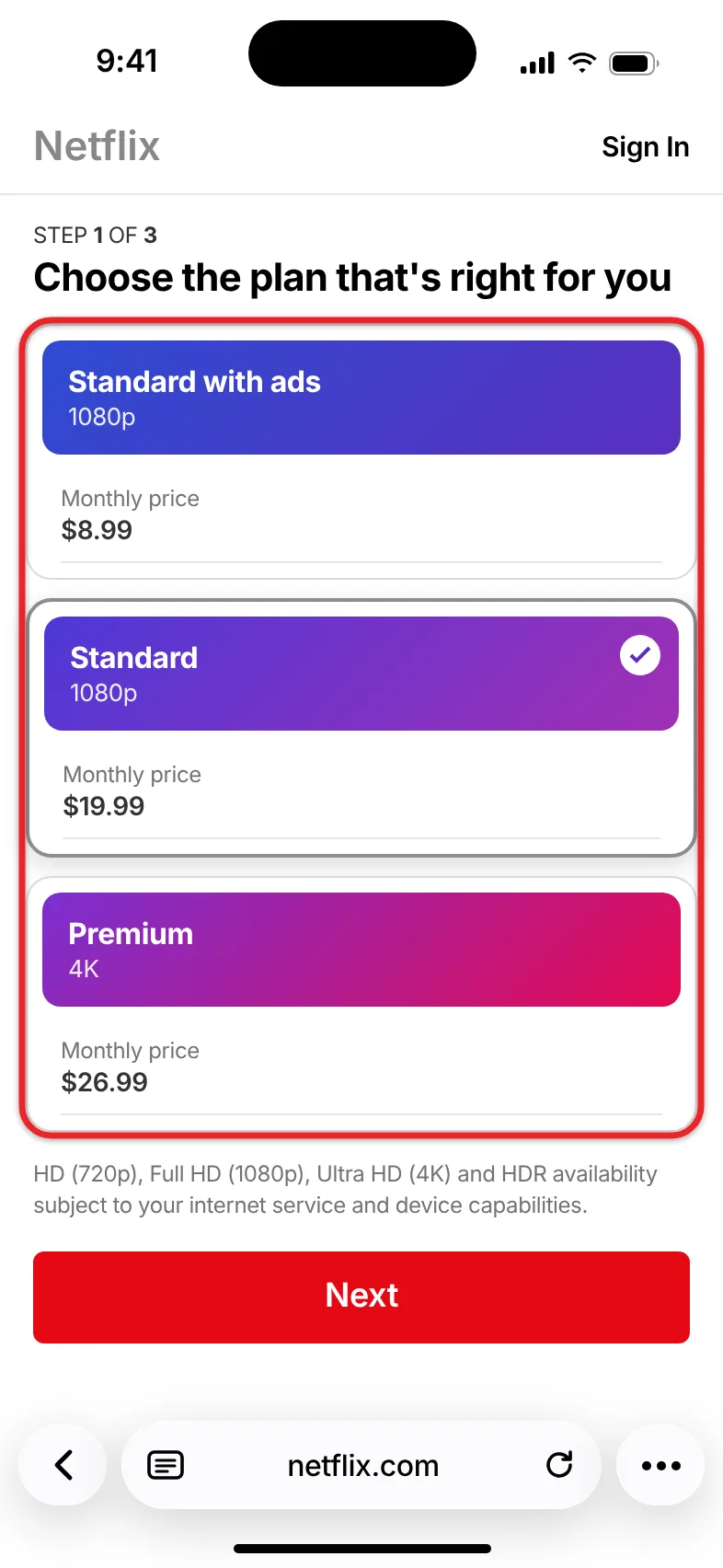
Netflix bills monthly on the day you signed up. There are no annual, multi-month, or lifetime plans, so a year of each plan at today’s price works out like this before tax:
| Plan | Cost for 12 months |
|---|---|
| Standard with ads | $107.88 |
| Standard | $239.88 |
| Premium | $323.88 |
The current prices took effect in late March 2026, when the ad plan went up $1 and the two ad-free plans went up $2 each.
Which plan makes sense on an iPhone
All three plans work on an iPhone. A few points matter most for phone viewing:
- 4K doesn’t matter much on a phone. Premium’s main extras are 4K video and four streams at once. If you mostly watch on your iPhone, you won’t see the difference on its screen. Pick Premium for a 4K TV or a large household.
- Downloads have limits. Each plan lets you save titles on a set number of phones or tablets. Ad-free plans allow up to 100 active downloads per device. Standard with ads is limited to 15 downloads per device each calendar month.
- Some titles are locked on the ad plan. The ad plan includes most movies and shows, and unavailable titles show a lock icon.
- The old Basic plan is gone. Netflix has discontinued it, so Standard with ads is now the cheapest plan.
Extra members
If you want to pay for someone outside your household, Netflix sells extra member slots. Standard allows one extra member and Premium allows up to two, at $7.99 a month each with ads or $9.99 without. Netflix doesn’t list extra members for Standard with ads. For more on households and how sharing works, read how Netflix streaming works.
You Can’t Subscribe Inside the Netflix iPhone App
Netflix’s sign-up help page says plainly that sign-up isn’t supported in the Netflix iOS app. The app lets you sign in and watch, but it won’t take your payment. Netflix’s Apple billing page also says Apple billing isn’t available to new or rejoining members. You sign up on the Netflix website instead, and you can do it from your iPhone:
- Open Safari and go to netflix.com/signup. The sign-up page opens.
- Choose a plan. The page shows each plan’s monthly price before you pay, and you can change plans later.
- Enter your email address and create a password for your account.
- Enter a payment method, such as a credit or debit card, PayPal, or a Netflix gift card code, and confirm. Your membership starts, and that day becomes your monthly billing date.
- Open the Netflix app (install it from the App Store if you haven’t yet) and sign in with the same email and password. Your profiles appear, and you can start watching.
For help installing the app and signing in, follow the steps to set up Netflix on an iPhone.
You can log out of the Netflix app on an iPhone whenever you want your account off that phone.
Because you pay Netflix directly, the charge shows up from Netflix on your card statement, not from Apple. There’s no extra fee for paying this way.
Change your plan later
To switch plans, sign in at netflix.com in Safari, open the Change plan page from your account, pick the new plan, tap Continue or Update, and confirm. According to Netflix’s change plan page, an upgrade takes effect right away and may be charged as a prorated amount. A downgrade starts on your next billing date, and you keep the higher plan’s features until then.
If You’re Still Billed Through Apple
Some long-time members who first joined in the iPhone app are still billed by Apple. To check, look for Netflix under Settings > your name > Subscriptions on your iPhone, or sign in at netflix.com and open Account to see how you pay.
To cancel an Apple-billed Netflix plan on your iPhone:
- Open Settings and tap your name at the top.
- Tap Subscriptions. A list of your Apple-billed subscriptions opens.
- Tap Netflix.
- Tap Cancel Subscription. You may need to scroll down to find it.
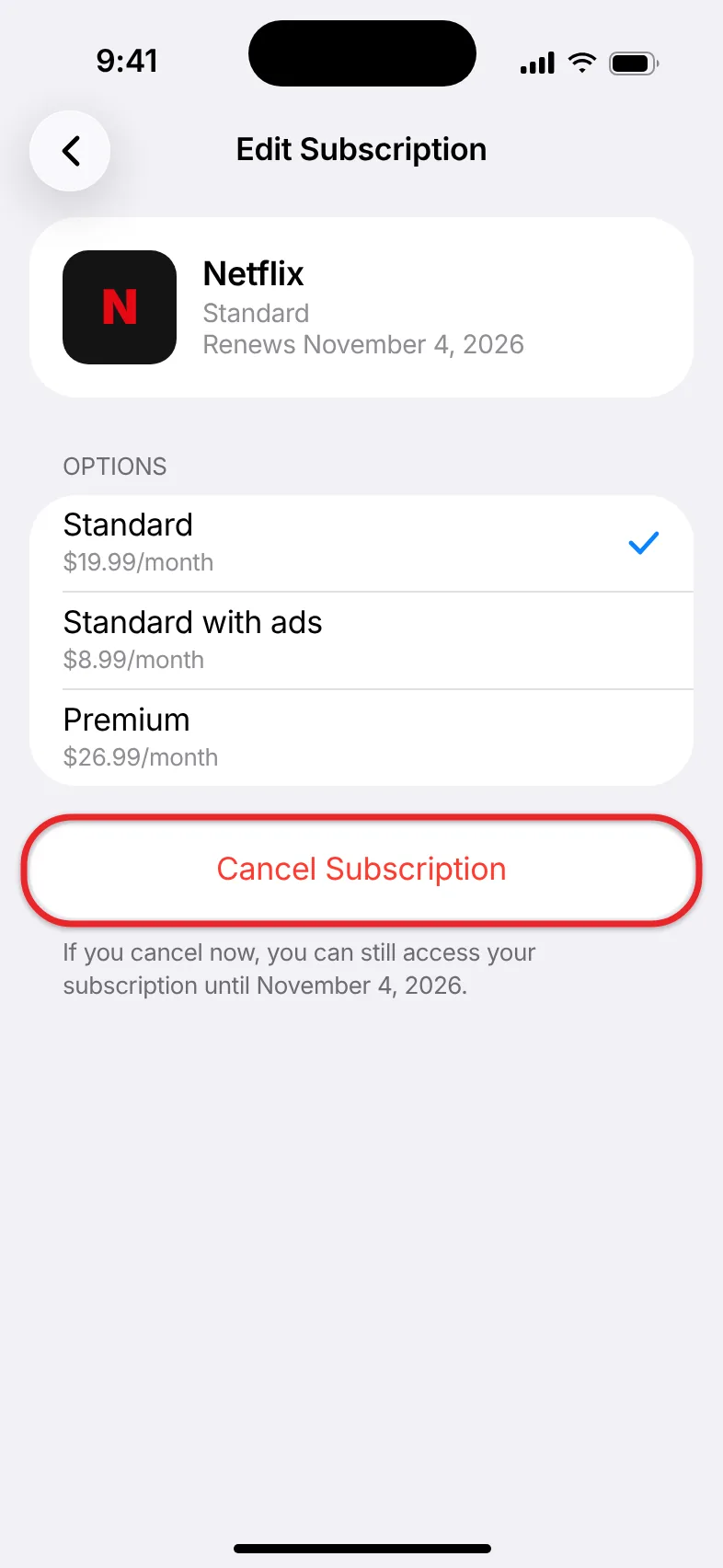
If there’s no Cancel Subscription button, or you see an expiration date in red, the subscription is already canceled. Apple’s own steps are on its cancel a subscription page.
A few rules from Netflix apply to Apple billing:
- Plan changes. Upgrades take effect immediately, and downgrades take effect on your next billing date. Members who signed up before May 10, 2014, must cancel through Apple before changing plans.
- Canceling. Netflix puts the account on hold for 30 days and then cancels it completely. Cancel more than 24 hours before your renewal date, or Apple may renew it again.
- No rejoining through Apple. After you cancel, you’ll need to rejoin on the Netflix website.
- Gift cards. Netflix gift cards can’t be redeemed on Apple-billed accounts.
To move to direct billing, sign in at netflix.com, go to Account > Manage payment info, and add a card or PayPal account. If you make this switch, you must also cancel Netflix through Apple to stop future Apple charges. Wait until your next billing period before changing plans, or the account can go back to Apple billing.
The Hidden Cost: Cellular Data
Netflix doesn’t charge extra for watching on cellular, but your carrier might. Netflix’s data usage page gives these estimates for mobile streaming in the app:
| Cellular Data Usage setting | About how much data |
|---|---|
| Automatic | 1 GB every 4 hours |
| Save Data | 1 GB every 6 hours |
| Maximum Data | 1 GB every 20 minutes or more |
| Wi-Fi Only | No cellular data for streaming |
On a limited plan, Maximum Data can use up a monthly allowance in a few movies and lead to overage charges or slowed speeds. Maximum Data is meant for unlimited plans only. To change the setting:
- Open the Netflix app and tap My Netflix in the lower-right corner.
- Tap your profile name at the top, then tap App Settings.
- Under Video Playback, tap Cellular Data Usage. The options appear.
- Choose Wi-Fi Only to block cellular streaming, or Save Data to stretch your data. Tap OK if the app asks you to confirm. If the choices are greyed out, turn off Automatic first.
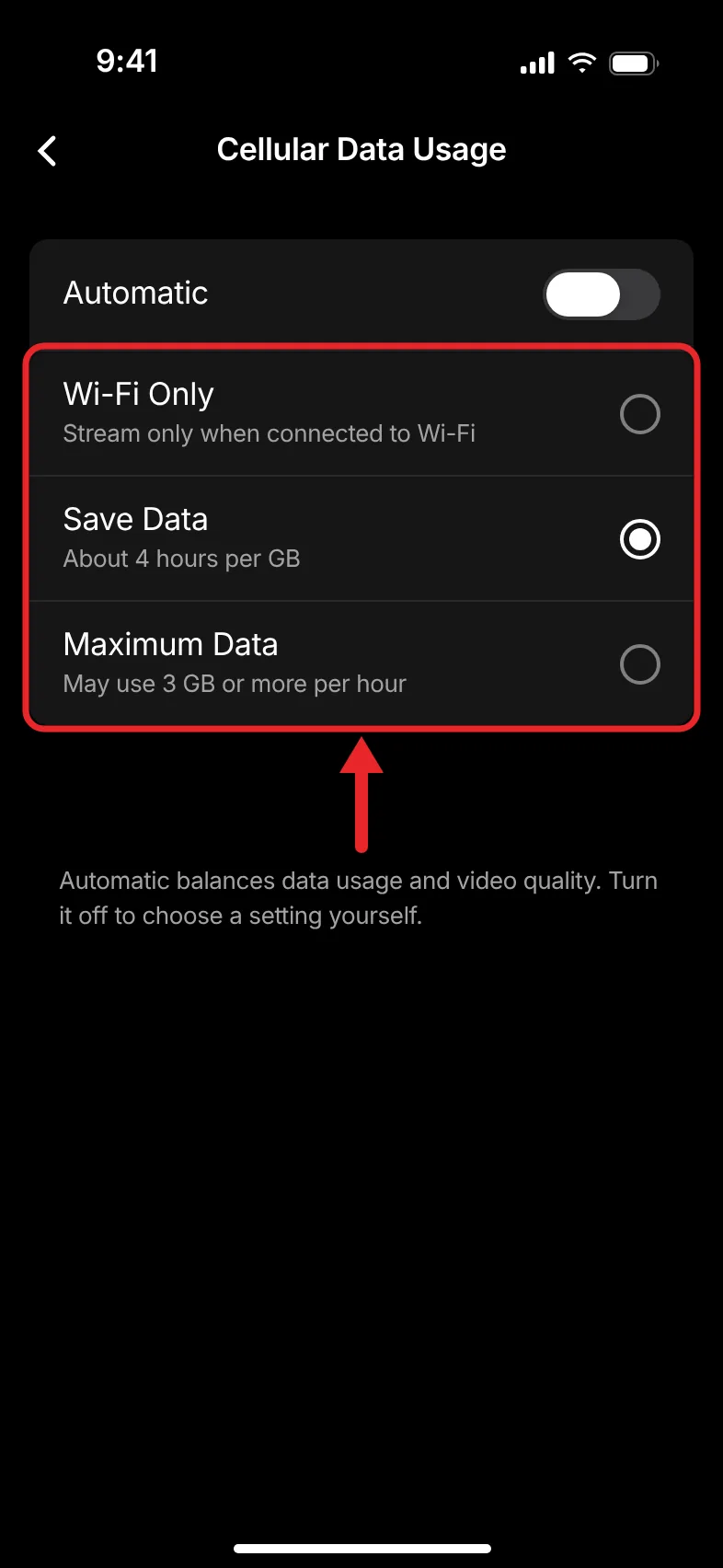
Learn more about the Save Data and Maximum Data options in the Netflix iPhone app. Another way to avoid cellular use is to download episodes on Wi-Fi at home and watch them offline later.
If the App Says You Can’t Sign Up
- The app says you can’t sign up here. That’s expected. Netflix doesn’t sell plans in the iPhone app. Sign up at netflix.com in Safari, then return to the app and sign in.
- The app won’t install or update. The current Netflix app needs iOS 18 or later. Check Settings > General > Software Update to update your iPhone.
- You see a charge from Apple for Netflix. You’re on legacy Apple billing. Check Settings > your name > Subscriptions to see the plan and price.
- Netflix isn’t listed under Subscriptions. You’re billed by Netflix directly or through a partner such as T-Mobile, Verizon, Xfinity, Spectrum, Cox, or DirecTV. Check Account at netflix.com, or check your phone or cable bill.
- You still get Apple charges after switching to Netflix billing. Cancel Netflix under Subscriptions on your iPhone as well, as Netflix requires.
- A gift card won’t apply. Gift cards don’t work with Apple billing. Switch to direct billing first.
- Your price looks different from the table. Netflix through a phone, internet, or TV package can have different prices and plan options. Check with that provider.
Netflix iPhone Pricing Questions
Is the Netflix app free on iPhone?
Yes. The app is a free download from the App Store. You need a paid Netflix membership to watch anything.
The same free app works on tablets too, so you can watch Netflix on iPad with the same account.
Is there a free trial of Netflix on iPhone?
No. Netflix doesn’t offer free trials. The cheapest way to try it is one month of Standard with ads, which you can cancel online at any time.
Do I pay extra to use Netflix on my iPhone and my TV?
No. One membership works on all your devices. The plan only limits how many screens can play at the same time: two on the Standard plans and four on Premium. If your TV doesn’t have Netflix, a streaming stick like the Amazon Fire TV Stick adds it without another subscription.
Can I pay for Netflix with Apple Pay?
Apple Pay isn’t one of the US payment options on Netflix’s payment methods page, even though some price guides say otherwise. Netflix accepts Visa, Mastercard, American Express, and Discover credit, debit, and prepaid cards, plus PayPal, Netflix gift cards, and billing through partners. Debit and prepaid cards must allow recurring online payments.
Can I watch Netflix on my iPhone without the internet?
Yes, if you download titles first. Tap the download button on a show or movie while you’re on Wi-Fi, and find it later under My Netflix > Downloads. For the details, read about downloading Netflix shows on an iPhone.

Matthew Burleigh is the founder, head writer, and editor of Solve Your Tech, which he launched in 2012. He has written technology tutorials since 2008 and worked in IT since 2003, including small-business support, IT management, and consulting. He holds Bachelor’s and Master’s degrees in Computer Science from Arizona State University.
Matthew writes practical guides for Windows, iPhone and iPad, Microsoft Office, Outlook, Google apps, and Android. Solve Your Tech’s guides are checked step by step against the device or app maker’s own documentation and tested on his own devices whenever he has the hardware or software, with clear steps, sources, and update dates.
Read more about Matthew and how Solve Your Tech writes and updates its guides, or report a correction.