To change sound quality in Spotify on your phone, tap your profile picture, tap Settings and privacy, and pick a level under Media Quality. Volume normalization, the equalizer, and crossfade are under Playback in the same menu. On a computer, click your profile picture and choose Settings. The same Settings and privacy menu holds your privacy controls; see how to change Spotify privacy settings.
This guide follows Spotify’s own support articles on audio quality, volume normalization, the equalizer, and transitions between tracks. It covers each setting on iPhone, Android, and desktop, which ones need Premium, and what to know when you use Spotify Connect.
How to Change Audio Quality
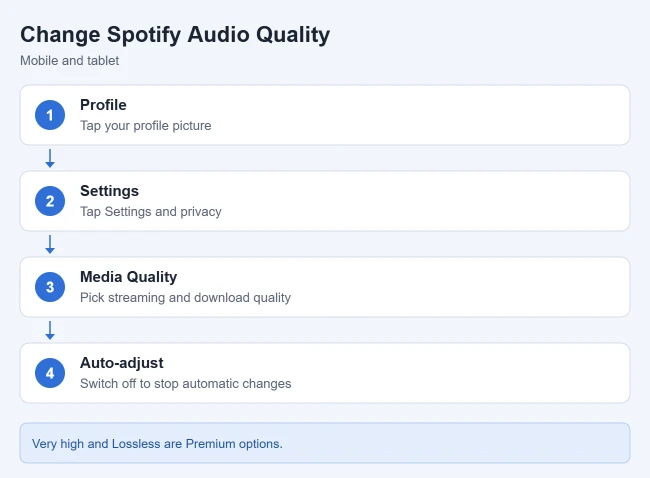
- Tap your profile picture at the top.
- Tap Settings and privacy.
- Under Media Quality, choose your settings. Spotify lets you set different streaming quality for Wi-Fi and cellular, plus a separate download quality.
Result: New playback and downloads use your chosen quality. Spotify notes that higher streaming quality uses more data, and higher download quality uses more space.
Spotify quality levels
- Automatic: depends on your network connection
- Low: about 24 kbit/s
- Normal: about 96 kbit/s
- High: about 160 kbit/s
- Very high: about 320 kbit/s (Premium)
- Lossless: up to 24-bit/44.1 kHz FLAC (Premium)
On the web player, Spotify streams at AAC 128 kbit/s on the free plan and AAC 256 kbit/s on Premium, and you can’t change it. Podcasts play at about 96 kbit/s on most devices, and Spotify says they drop to about 24 kbit/s if you set mobile quality to Low.
Stop Spotify from changing quality on its own
By default, Spotify adjusts audio quality so music plays without stuttering. To keep your chosen level, switch Auto-adjust off in the same Media Quality section. On desktop, it’s Auto adjust quality under Audio Quality.
How to Turn Volume Normalization On or Off
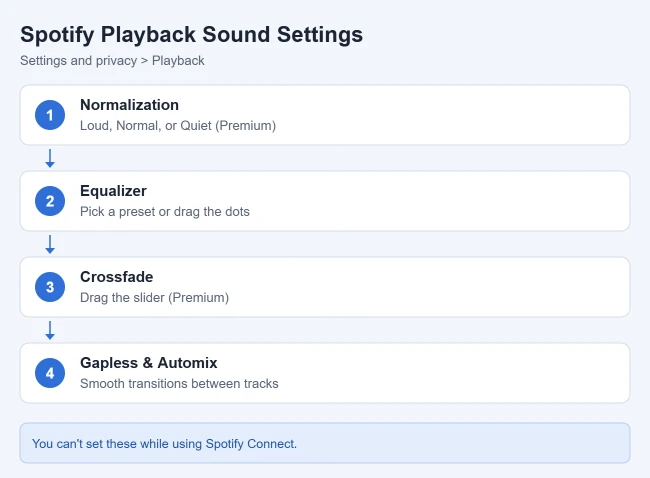
Spotify says volume normalization balances soft and loud songs for a more uniform listening experience. Spotify lists it as a Premium feature.
- Tap your profile picture, then Settings and privacy.
- Tap Playback.
- On iPhone, switch Enable Audio Normalization on or off. On Android, it’s Volume normalization under Volume controls.
- Next to Volume level, choose Loud, Normal, or Quiet.
Result: Songs play at a more even volume. Spotify describes Loud as handy for noisy environments, with less dynamic levels, and Quiet as handy for quieter ones. Normal is the default. On desktop, switch on Normalize volume under Audio Quality.
How to Use the Spotify Equalizer
- Go to Settings and privacy > Playback.
- Switch Equalizer on. On Android, it’s under Listening controls.
- Choose a preset, or drag the dots to find a sound you like.
Result: The bass and treble levels change for music and podcasts. Spotify notes that on Android phones with a built-in equalizer, your changes also affect other apps. On desktop, the Equalizer switch is under Playback in Settings.
How to Set Crossfade, Gapless Playback, and Automix
- Crossfade (Premium): overlaps two tracks by fading out of one while fading in the next. On mobile, go to Settings and privacy > Playback and drag the Crossfade slider. On desktop, switch on Crossfade songs under Playback and set the length.
- Gapless playback: removes gaps or pauses between tracks. Switch it on under Track transitions in Playback.
- Automix (Premium): beat-matched transitions between songs on select Spotify playlists, even on Shuffle. It’s under Track transitions on mobile and under Playback on desktop.
Using Spotify Connect?
Spotify says you can’t change normalization, the equalizer, or track transitions while you’re using Spotify Connect to play on another device. Its audio quality article says you can change audio settings on another device when using Spotify Connect, so check the quality settings on the device that’s playing.
Frequently Asked Questions
Can I change audio quality on the Spotify web player?
No. Spotify says you can’t adjust music quality on the web player. Use the desktop or mobile app instead.
How do I use less data on Spotify?
Pick a lower streaming quality for cellular under Media Quality. Spotify’s Low setting is about 24 kbit/s. Related: how to clear the Spotify cache and how to create and edit Spotify playlists.
If you listen at bedtime, you can also set a Spotify sleep timer on iPhone so music stops on its own. Listen on Pandora as well? Here is how to increase audio quality in Pandora on an iPhone.

Matthew Burleigh has been writing tech tutorials since 2008. His writing has appeared on dozens of different websites and been read hundreds of millions of times.
After receiving his Bachelor’s and Master’s degrees in Computer Science he spent several years working in IT management for small businesses. However, he now works full time writing content online and creating websites.
His main writing topics include iPhones, Microsoft Office, Google Apps, Android, and Photoshop, but he has also written about many other tech topics as well.