To clear local history in the Reddit iPhone app, tap your profile picture in the top-right corner, tap Settings, scroll down to the Advanced section, tap Clear local history, and then tap Clear local history again to confirm. The posts you’ve viewed disappear from the History list in the app on that iPhone.
These steps are for the official Reddit app from the App Store on an iPhone running iOS 26 or iOS 27. The same steps work on an iPad. Older versions of the app put the profile button in the top-left corner, so if your screen looks different, look for your avatar along the top of the app.
What “Local History” Means in Reddit
Reddit keeps a list of posts you’ve opened so you can find them again. On iPhone, you can see it by tapping your profile picture and choosing History in the menu that slides in from the right.
That list is what Reddit calls local history. “Local” means it’s stored on this device. That has a few practical effects:
- Clearing it removes the viewed posts from the History list in the app on this iPhone.
- It doesn’t touch history on your computer, your iPad, or the Reddit website. Those keep their own lists, and you clear each one separately.
- It doesn’t delete anything you’ve posted, commented on, upvoted, or saved. Those are tied to your account, not to your viewing history.
If you’re clearing history because someone else uses your phone, it helps to know exactly what this does and doesn’t hide. The sections below cover the other places where your Reddit activity can show up.
Clear Your Local History on iPhone
- Open the Reddit app. Your Home feed appears.
- Tap your profile picture (your avatar) in the top-right corner. A menu slides in from the right side of the screen with your username at the top.
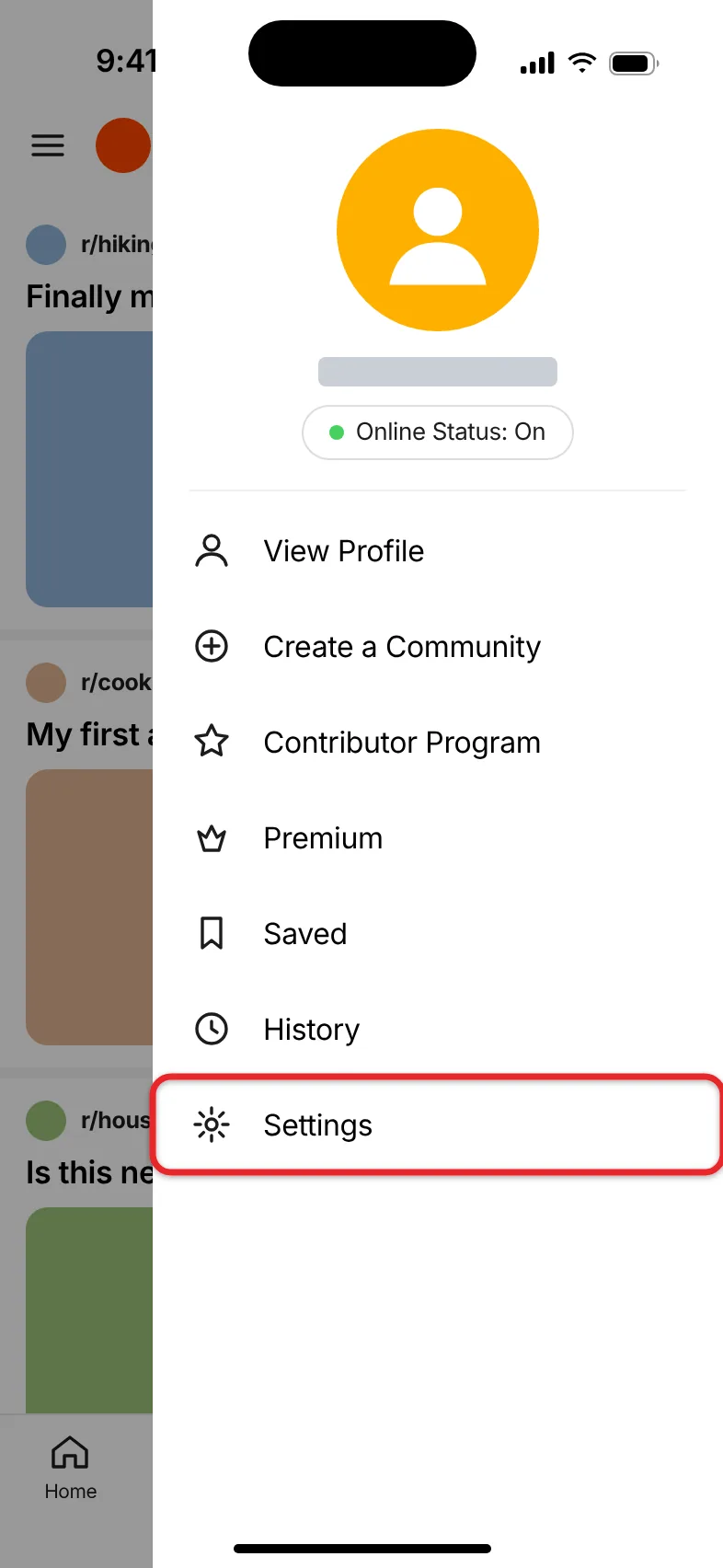
- Tap Settings near the bottom of that menu. The Settings screen opens, with your account options at the top.
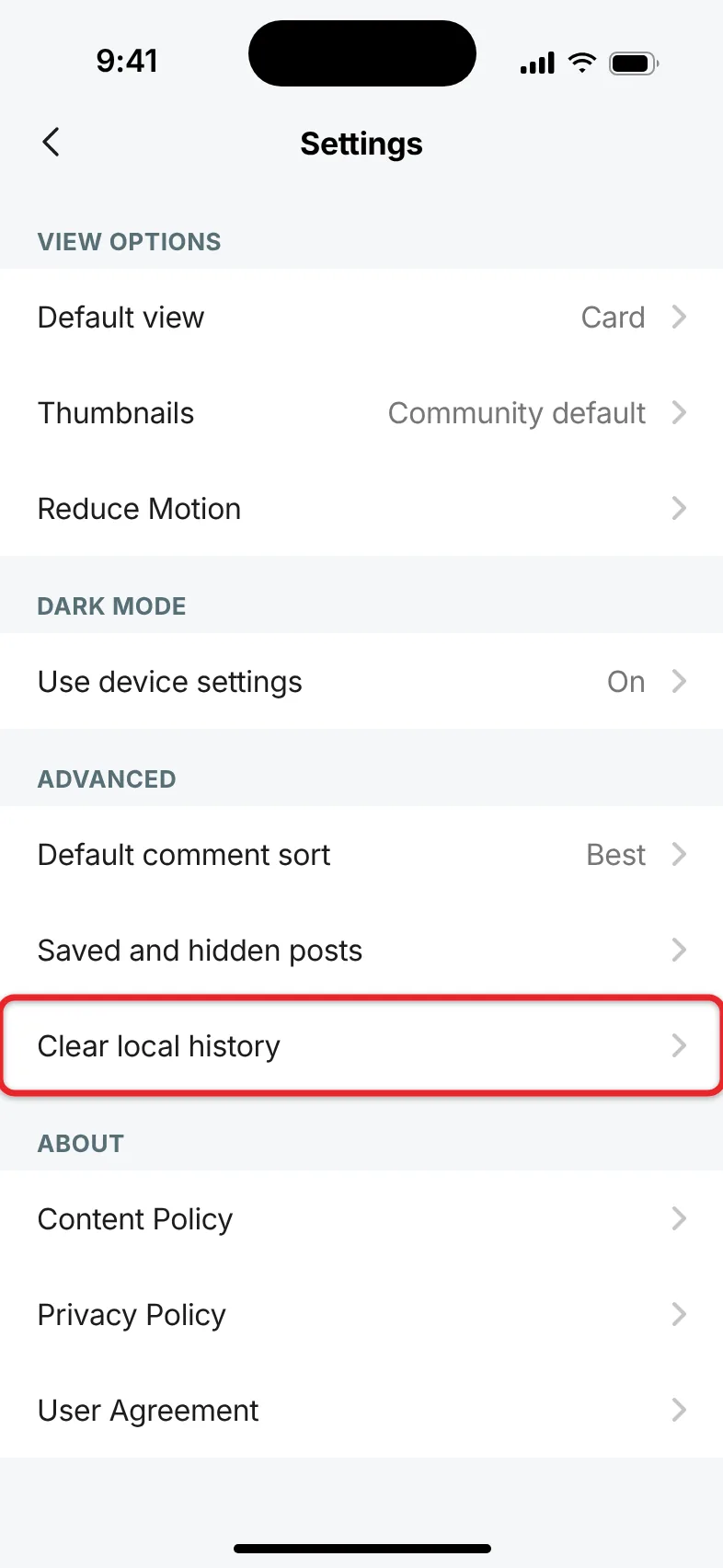
- Scroll down to the Advanced section and tap Clear local history. A confirmation appears at the bottom of the screen.
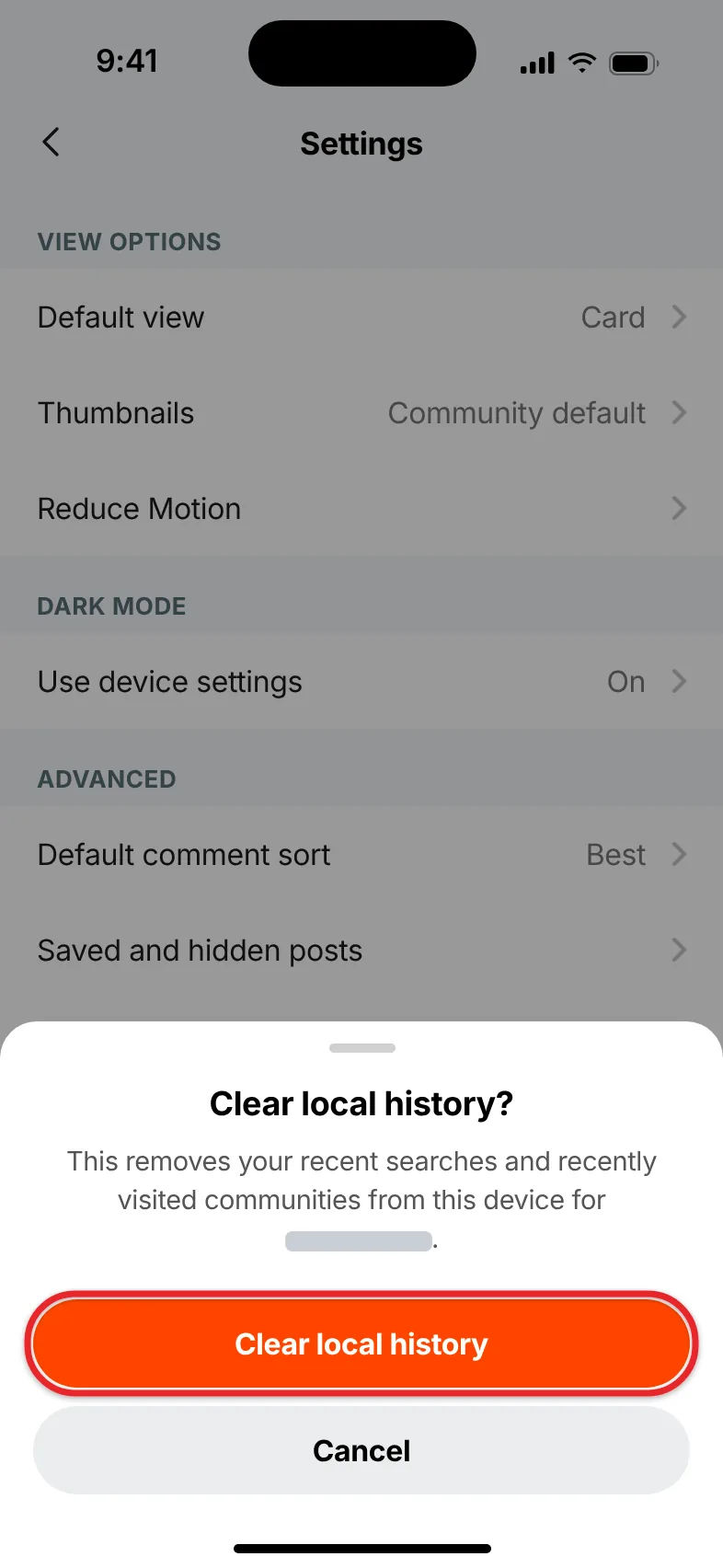
- Tap Clear local history to confirm. A short Local history cleared message appears at the bottom of the screen.
To check that it worked, go back to your profile menu and tap History. The list should be empty. It starts filling up again as soon as you open new posts.
There’s no undo. Once you clear local history, Reddit can’t bring that list back, so if you want to keep a post you found, tap Save on it first. Saved posts stay in your Saved list and aren’t affected.
Clear Recent Searches
When you tap the search bar at the top of the Reddit app, it shows your recent searches. Clearing local history also clears these searches on iPhone. If you only want to remove one or two of them:
- Tap the search bar or search icon at the top of the app. Your recent searches appear in a list.
- Tap the X next to a search you want to remove. It disappears from the list right away.
This is handy when one search would give away a gift or a private topic, but you don’t want to lose the rest of your history.
Clear Reddit History on the Website and Android
Since local history stays on each device, clearing it on your iPhone won’t clear it anywhere else. If you also use Reddit in a browser or on an Android phone, repeat the process there.
On reddit.com in a desktop browser:
- Click your profile picture in the top-right corner and choose Settings.
- Click the Privacy tab.
- Under Advanced, click Clear next to Clear history, and confirm.
The Recent posts box on the right side of the Reddit home page also has a Clear link if you only want to empty that box.
In the Reddit Android app: tap your profile picture, tap History, tap the three dots at the top right, and choose Clear history. Some versions label it Clear recent history.
Reddit isn’t the only place a visited post can show up. If you open Reddit links in Safari, those pages are also saved in Safari’s history. To remove them there, clear search history on iPhone.
Outside links can open in Safari or another browser instead of Reddit’s own viewer if you change the browser the Reddit iPhone app uses.
Browse Without Saving History
If you’d rather not have to clear history at all, Reddit’s Anonymous Browsing mode is a better fit. While it’s on, Reddit doesn’t save your browsing or search history to your account, and that session’s history is erased when you leave it.
To turn it on, press and hold your profile picture in the Reddit app and choose Anonymous Browsing from the menu that pops up.
Keep these limits in mind, which come from Reddit’s Anonymous Browsing help page:
- You can’t post, comment, vote, chat, or join communities while it’s on, and you won’t see your personalized Home feed.
- It ends after 30 minutes without activity and puts you back in your regular account.
- It only covers Reddit. Your phone, your internet provider, and websites you open from Reddit can still see what you do.
Anonymous Browsing works well for a quick look at a topic you don’t want in your history or recommendations. For everyday browsing, clearing local history now and then is simpler.
If Your History Comes Back or the Option Is Missing
- The History list fills up again. That’s expected. Clearing local history wipes the current list, but Reddit keeps recording new posts you open. Clear it again whenever you need to, or use Anonymous Browsing for sessions you don’t want saved.
- You still see old posts on your computer. The iPhone and the website keep separate history. Clear it on reddit.com using the steps above.
- You can’t find the Advanced section. Scroll to the bottom of Settings. If it still isn’t there, update the app from the App Store: open the App Store, tap your account picture at the top right, and pull down to refresh the list of updates.
- You don’t see a profile picture in the top-right corner. Older versions of the app put it in the top-left. Updating the app moves it to the current layout.
- You’re worried about someone opening the app at all. Clearing history doesn’t stop someone from scrolling your feed, Saved list, or messages. iOS can require Face ID or a passcode to open Reddit once you hide or lock apps on iPhone.
Reddit History Questions
Does clearing local history delete my posts and comments?
No. It only empties the list of posts you’ve viewed on this device. Your posts, comments, votes, and saved items stay on your account. You have to delete those individually from your profile.
Can other people see my Reddit browsing history?
Other Redditors can’t see which posts you’ve viewed. Your history is only visible to someone who can open the Reddit app while you’re signed in, which is why clearing it is useful on a shared phone.
Does deleting the Reddit app clear my history?
Deleting the app removes its data from your iPhone, including local history, and you’ll need to sign in again after reinstalling it. Clearing local history in Settings does the same job without logging you out.
Will clearing local history change my Home feed recommendations?
It removes the viewed posts from your History list, but Reddit also uses your account activity, such as the communities you join and the posts you vote on, to pick what you see. Clearing local history won’t reset those signals. If you don’t want a session to affect your feed at all, use Anonymous Browsing.
Is there a way to change other Reddit app settings on iPhone?
Yes. The same Settings screen has options for videos, themes, and links. For example, you can turn off autoplay in the Reddit iPhone app so videos don’t start playing as you scroll.
The same Settings screen is also where you can turn on a black background in Reddit.

Matthew Burleigh is the founder, head writer, and editor of Solve Your Tech, which he launched in 2012. He has written technology tutorials since 2008 and worked in IT since 2003, including small-business support, IT management, and consulting. He holds Bachelor’s and Master’s degrees in Computer Science from Arizona State University.
Matthew writes practical guides for Windows, iPhone and iPad, Microsoft Office, Outlook, Google apps, and Android. Solve Your Tech’s guides are checked step by step against the device or app maker’s own documentation and tested on his own devices whenever he has the hardware or software, with clear steps, sources, and update dates.
Read more about Matthew and how Solve Your Tech writes and updates its guides, or report a correction.