To turn off autoplay in the Reddit iPhone app, tap your avatar to open your profile, tap the three-line menu near the top right, choose Settings, and tap Media & animations in the Accessibility section. Set Autoplay Video Previews to Never, and turn off Autoplay Animated Images if you also want to stop GIFs.
These steps follow Reddit’s Accessibility Guides: Reduce Motion & Autoplay help article, which covers the iPhone and Android apps as well as reddit.com. The settings have moved since older versions of the app, which put Autoplay directly on the main Settings screen.
In this article:
- Turn off autoplay in the Reddit app
- What each autoplay option does
- Turn on Reduce motion
- Turn off autoplay on reddit.com
- Related iPhone motion settings
- FAQs
How to Stop Videos From Playing Automatically in the Reddit App
Autoplay starts videos as you scroll past them in your feed. Turning it off saves data and keeps your feed still until you choose to watch something.
- Open the Reddit app.
- Tap your avatar icon to go to your profile page.
- Tap the three-line menu near the top right corner.
- Tap Settings.
- Scroll down to the Accessibility section and tap Media & animations.
- Tap Autoplay Video Previews and choose Never.
- Optional: turn off the Autoplay Animated Images toggle to stop GIFs from playing on their own.
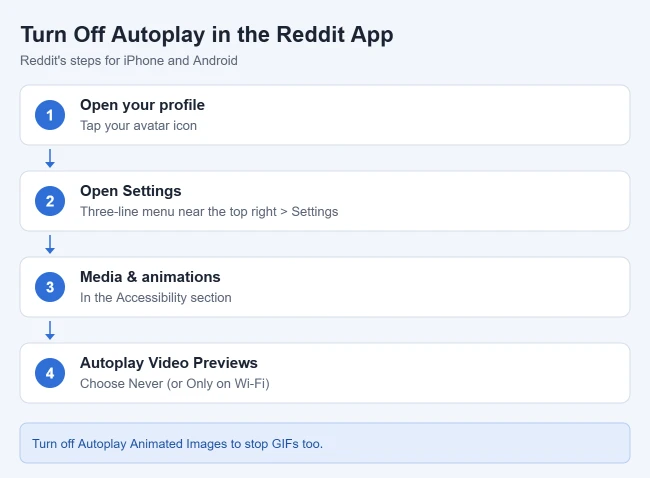
Result: Videos in your feed stay paused until you tap them. If you turned off Autoplay Animated Images, GIFs stay still too.
What Each Autoplay Option Does
Reddit lists three choices for Autoplay Video Previews:
- Always: videos start playing in your feed on Wi-Fi and on cellular data.
- Only on Wi-Fi: videos autoplay when you are connected to Wi-Fi, but not on cellular data. This is a good middle ground if your main concern is your data plan.
- Never: videos never start on their own.
Reddit treats GIFs separately. The Autoplay Animated Images toggle disables all animated GIFs, so you can stop videos but keep GIFs moving, or the other way around. If you are trying to cut your data use, see our ways to reduce cellular data usage on iPhone.
How to Turn On Reduce Motion in the Reddit App
Reddit also has a Reduce motion setting in the same menu. Reddit says it minimizes dynamic elements such as animated awards and achievements, parallax transitions and other motion effects, which can help people who find animations distracting or uncomfortable.
- Tap your avatar, then the three-line menu, then Settings.
- Tap Media & animations in the Accessibility section.
- Turn on the Reduce motion toggle.
Result: Animations around the app are toned down, alongside your autoplay choices.
How to Turn Off Autoplay on reddit.com
If you also browse Reddit on a computer, the website has its own setting:
- Click your avatar in the top right corner.
- Select Settings from the dropdown menu.
- Go to the Preferences tab.
- Turn off the Autoplay Media toggle. Reddit says this covers both videos and animated GIFs.
The same Preferences tab has a Reduce motion toggle and an option to sync with your computer’s motion settings.
Related iPhone Motion Settings
Your iPhone has its own motion controls in Settings > Accessibility > Motion. According to Apple’s onscreen motion guide, Auto-Play Animated Images controls GIFs and moving elements in Messages and Safari, and Auto-Play Video Previews lets apps such as the App Store play video previews automatically. Reduce Motion cuts down screen transitions and other effects. For your own camera roll, you can also turn off video autoplay in the iPhone Photos app.
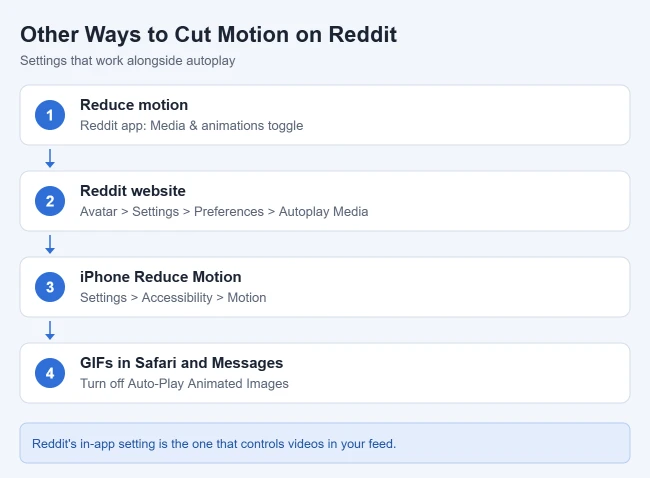
These are system settings for Apple’s features. To control videos in your Reddit feed, use the Reddit app’s own Autoplay Video Previews setting described above.
Frequently Asked Questions
Why can’t I find Autoplay in my Reddit settings?
In the current app, it is under Media & animations in the Accessibility section of Settings, not on the main Settings screen. Make sure the Reddit app is updated in the App Store.
Do I need to change this on every device?
Reddit lists separate steps for the app and for reddit.com, so plan to change the setting in each place you use Reddit.
More Reddit and Autoplay Guides
- How to use a black background in the Reddit iPhone app
- How to clear local history in the Reddit iPhone app
- How to change the web browser used by the Reddit iPhone app
- How to stop YouTube videos from autoplaying on iPhone
- How to turn off video autoplay in the iPhone Twitter app

Matthew Burleigh is the founder, head writer, and editor of Solve Your Tech, which he launched in 2012. He has written technology tutorials since 2008 and worked in IT since 2003, including small-business support, IT management, and consulting. He holds Bachelor’s and Master’s degrees in Computer Science from Arizona State University.
Matthew writes practical guides for Windows, iPhone and iPad, Microsoft Office, Outlook, Google apps, and Android. Solve Your Tech’s guides are tested on current devices or checked against official product documentation, with clear steps, sources, and update dates.
Read more about Matthew and how Solve Your Tech writes and updates its guides, or report a correction.