Your iPhone’s screen can get very bright. It may not seem like it when you are trying to read something outside on a really sunny day, but it can be blinding when you are reading your screen in a low-light environment.
Making some changes to your brightness settings can go a long way toward fixing this problem, but there are other measures that you can take as well.
For example, you could try enabling night mode in the Firefox browser, if that is how you browse websites. Our tutorial below will show you where to find the night mode setting in the Firefox iPhone app so that you can enable or disable it as needed.
How to Enter or Exit the Firefox Night Mode on an iPhone 7
The steps in this article were performed on an iPhone 7 Plus in iOS 11.3.2. Note that by enabling night mode, the appearance of the browser will change until you turn it off.
Night mode changes a number of things about the way that Web pages look, specifically by making background colors black instead of white, and switching the text from black to white.
While this can be helpful for your eyes when you are browsing in low-light environments, it can make some websites difficult to read or navigate, depending on the way in which those sites were designed.
Step 1: Open the Firefox browser on your iPhone.

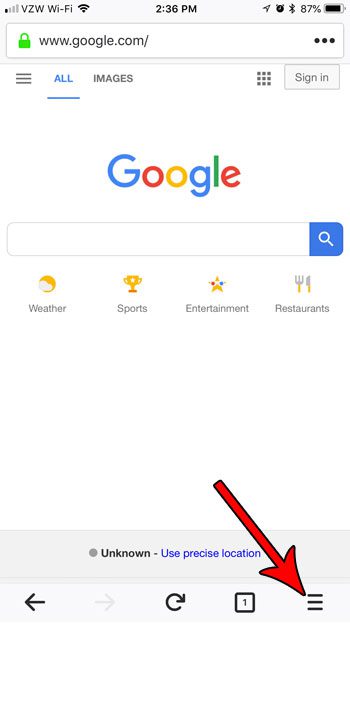
Step 2: Tap the button at the bottom-right corner of the screen with the three lines.
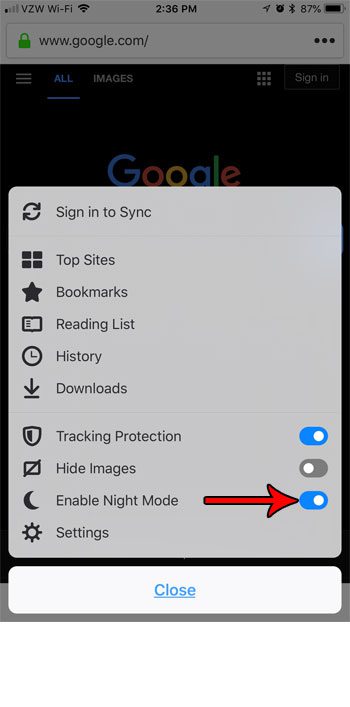
Step 3: Tap the button to the right of Enable Night Mode to turn it on or off. I have it turned on in the picture below.
Now that you know how to enable or disable night mode in the Firefox iPhone app, you can try out both display options to see which one you prefer.
There are other popular apps that have a night mode, too. Find out how to enable night mode in twitter and get the gray background that you may have seen in screenshots created by other people.

Matthew Burleigh has been writing tech tutorials since 2008. His writing has appeared on dozens of different websites and been read over 50 million times.
After receiving his Bachelor’s and Master’s degrees in Computer Science he spent several years working in IT management for small businesses. However, he now works full time writing content online and creating websites.
His main writing topics include iPhones, Microsoft Office, Google Apps, Android, and Photoshop, but he has also written about many other tech topics as well.