
What File Format is My USB Flash Drive?
To see what file format your USB flash drive uses in Windows, open File Explorer, select This PC, right-click the drive, choose Properties, and read …
How-to guides and articles to help you with your home electronics, like set-top streaming boxes, smart devices, and more.
To see what file format your USB flash drive uses in Windows, open File Explorer, select This PC, right-click the drive, choose Properties, and read …

This post contains affiliate links. As an Amazon Associate, solveyourtech.com earns from qualifying purchases, at no extra cost to you. To record video on a …

To turn off the screensaver on a Roku TV, press Home on the remote, open Settings > Theme > Screensaver wait time, select Disable screensaver, …

To use a photo from your iPhone as your Echo Show background, upload it to Amazon Photos with the Amazon Photos app. Then, on the …

To turn off interest-based ads on an Amazon Fire TV Stick, go to Settings > Preferences > Privacy Settings and select Interest-based Ads so that …

To turn off navigation sounds on an Amazon Fire TV Stick, go to Settings > Display & Sounds > Audio, then select Navigation Sounds so …

To turn on automatic updates for apps on an Amazon Fire TV Stick, go to Settings > Applications > Appstore and select Automatic Updates so …

To restart an Amazon Fire TV Stick, go to Settings > My Fire TV > Restart and select Restart again to confirm. If the menu …

This post contains affiliate links. As an Amazon Associate, solveyourtech.com earns from qualifying purchases, at no extra cost to you. To hide chat in Twitch …

To make your TV switch to your Roku automatically, turn on 1-touch play on the Roku: press Home, then go to Settings > System > …

To reboot a Roku Premiere Plus (or any Roku streaming player, Streaming Stick, or Roku TV), press Home on the remote, then go to Settings …

To enable closed captions on a Roku Premiere Plus, press Home, open Settings > Accessibility > Captions mode, and choose On always. If your Roku …

To rename an input on a Roku TV, press Home, highlight the input tile (such as HDMI 1), press the Star button, and select Rename …
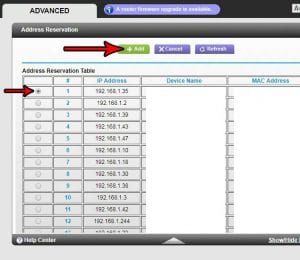
To reserve an IP address on a Netgear N600, sign in to the router at http://www.routerlogin.net, select ADVANCED > Setup > LAN Setup, click Add …

To turn off the notification sound on an Echo Dot, open the Alexa app, open More, select Settings, select Notifications, then use the toggles to …

This post contains affiliate links. As an Amazon Associate, solveyourtech.com earns from qualifying purchases, at no extra cost to you. To AirPlay a picture from …

This post contains affiliate links. As an Amazon Associate, solveyourtech.com earns from qualifying purchases, at no extra cost to you. Before you buy an Amazon …

This post contains affiliate links. As an Amazon Associate, solveyourtech.com earns from qualifying purchases, at no extra cost to you. To open or close your …

To reinstall Netflix on a Roku, press Home, highlight the Netflix app, press the Star button, and select Remove app. Then open the Store, find …

To factory reset a Roku, press Home on the remote, then go to Settings > System > Advanced system settings > Factory reset and follow …

To set a clock as the screensaver on a Roku, press Home, go to Settings > Theme > Screensavers, highlight a clock screensaver, press OK, …

This post contains affiliate links. As an Amazon Associate, solveyourtech.com earns from qualifying purchases, at no extra cost to you. Pick the Google TV Streamer …

To change the video frame rate on a Nikon D3200, press MENU, open the Shooting menu, select Movie settings, then select Frame size/frame rate and …

This post contains affiliate links. As an Amazon Associate, solveyourtech.com earns from qualifying purchases, at no extra cost to you. To use voice search on …

This post contains affiliate links. As an Amazon Associate, solveyourtech.com earns from qualifying purchases, at no extra cost to you. Roku sells three streaming sticks, …

To connect an Apple TV to Wi-Fi, open Settings, select Network, select Wi-Fi, pick your network, and enter its password. If an Ethernet cable is …

To restart an Apple TV, go to Settings > System > Restart. If it isn’t responding, press and hold the TV button and the Back …

To block purchases and rentals on an Apple TV, go to Settings > General > Restrictions, turn Restrictions on, and create a four-digit passcode. Then …

This post contains affiliate links. As an Amazon Associate, solveyourtech.com earns from qualifying purchases, at no extra cost to you. To put files on a …

This post contains affiliate links. As an Amazon Associate, solveyourtech.com earns from qualifying purchases, at no extra cost to you. The cheapest way to watch …