
How to Add a Canon Wireless Printer to a Mac
To add a Canon wireless printer to a Mac, connect the printer to the same Wi-Fi network as your Mac, then open System Settings > …
 Matthew Burleigh
To add a Canon wireless printer to a Mac, connect the printer to the same Wi-Fi network as your Mac, then open System Settings > …

To turn AirPlay on or off on Apple TV, open Settings > AirPlay and Apple Home, then select AirPlay to switch it between On and …

To change the screen resolution on a MacBook Air, choose Apple menu › System Settings › Displays, then click one of the resolution thumbnails. Options …
To turn on the firewall in current macOS, choose Apple menu > System Settings > Network > Firewall and turn on Firewall. In OS X …

This post contains affiliate links. As an Amazon Associate, solveyourtech.com earns from qualifying purchases, at no extra cost to you. To connect a 2012 MacBook …

To get your iPhone pictures on your iPad with iCloud, turn on iCloud Photos on both devices. On each one, open Settings, tap your name …

To check how much space is left on your iPad, open Settings and tap General > iPad Storage. The bar at the top shows how …

To change your contact card on a MacBook Air, open the Contacts app, select the card with your information, and choose Card > Make This …

To turn off Download Intelligence in the current Norton 360 app, click Security, go to Advanced Security > Web > Safe Web, switch Download Intelligence …

To remove an installed theme in desktop Google Chrome, open More > Settings > Appearance, then select Reset to default. Chrome returns to its classic …

To save a PowerPoint file as a Word document, click File > Export > Create Handouts, then click the Create Handouts button. Pick a page …

To set or change the passcode on your iPad, open Settings, tap Face ID & Passcode (or Touch ID & Passcode), and tap Turn Passcode …

To move the Dropbox folder on your PC, click the Dropbox icon in the taskbar, click your avatar in the bottom-left corner, choose Preferences, open …

To change the admin password on a Netgear N600 router, go to routerlogin.net in a web browser on a device connected to the router, sign …
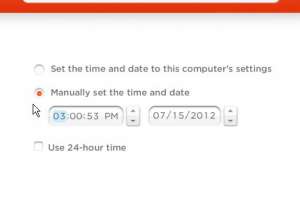
To change the time on the Nike+ SportWatch GPS, scroll up or down from the time of day to open the main menu, select clock, …

You can no longer enable or disable Google Cloud Print in Google Chrome. Google ended the service at the end of 2020, and its help …

To add a new user in Google Chrome, click the Profile icon at the top right, then click Add Chrome profile. Sign in with a …

To change your Yahoo Mail password, open the Yahoo Account security page, sign in to the correct account, and select Password under Ways of signing …

To feather a selection in Photoshop, make your selection, choose Select › Modify › Feather (or press Shift+F6), enter a Feather Radius in pixels, and …

Get the HP Color LaserJet CP1215 driver from HP’s official HP Color LaserJet CP1215 Software and Driver Downloads page. Confirm your operating system, open the …
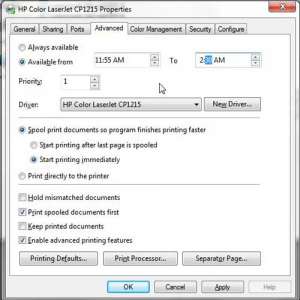
To set an available time for the HP Color LaserJet CP1215, open the printer’s Printer properties window in Windows, select the Advanced tab, choose Available …
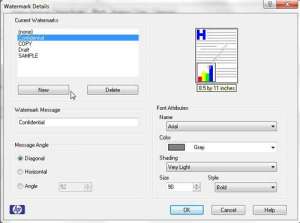
To add a watermark on the HP Color LaserJet CP1215, open the Print window in your program, select the printer, click Properties or Preferences, open …

To reset an HP Color LaserJet CP1215 to its factory defaults, open the HP Color LaserJet CP1210 Series Toolbox on a connected computer, click the …

To view quarantined files in Norton 360 on a Windows PC, open Norton, click Security in the left pane, click Security History, and choose Quarantine …

To update all your iPhone or iPad apps at once, open the App Store, tap your account picture or the My Account button at the …

To manage startup programs with Norton 360 on Windows, open Norton, click Performance in the left panel, and click Open on the Startup Manager tile. …

To remove personal information from a Word document, select File > Info > Check for Issues > Inspect Document, select Inspect, then select Remove All …

To print in black and white from Google Chrome, press Ctrl + P (Command + P on a Mac), pick your printer next to Destination, …

To send an Evernote note by email, share a link to the note or export it as a PDF and attach the file. Evernote no …

To reopen a closed tab in Google Chrome, press Ctrl + Shift + T (Command + Shift + T on a Mac). Press it again …