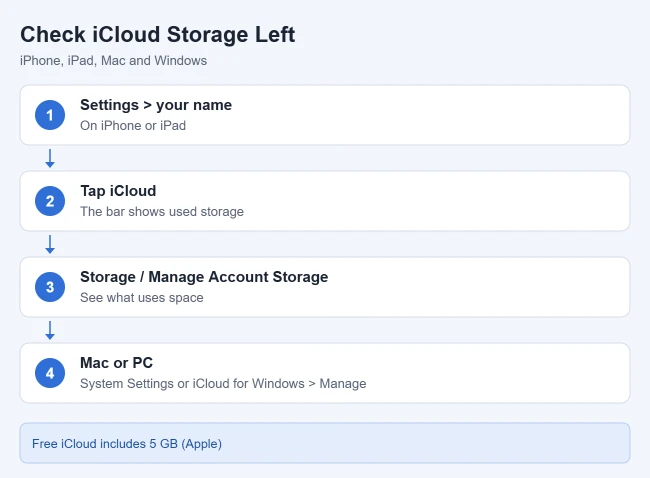
To see how much iCloud storage you have left on iPhone or iPad, open Settings, tap your name, then tap iCloud. The bar at the top shows how much of your plan you have used. Tap Storage or Manage Account Storage to see which apps and backups take up the most space. On a Mac, go to System Settings > your name > iCloud > Manage.
This guide covers checking your iCloud storage on iPhone, iPad, Mac, Windows and the web, what the storage categories mean, what happens when storage is full, and how to free up space. It is based on Apple’s Check your iCloud storage on any device, Apple’s Manage your iCloud storage on your Apple device and Manage storage on iPhone.
How to Check iCloud Storage on iPhone or iPad
- Open the Settings app.
- Tap your name at the top.
- Tap iCloud.
- Look at the bar graph at the top to see how much storage is used.
- Tap Storage or Manage Account Storage for a breakdown by app and backup.
The graph shows your overall storage use, and the list underneath shows which apps and features use the most. To find the space you have left, subtract the used amount from your plan’s total.
How to Check iCloud Storage on a Mac
- Choose the Apple menu > System Settings.
- Click your name at the top of the sidebar.
- Click iCloud, then click Manage.
A window lists the apps and features using your iCloud storage, with the total used at the top.
How to Check iCloud Storage on Windows or the Web
On a Windows PC:
- Open iCloud for Windows.
- Scroll down to the bar graph, which shows your overall storage use.
- Click Manage for details. Apps and features are listed on the left, largest first.
To check in a web browser:
- Go to icloud.com/storage and sign in with your Apple Account.
- Look at the storage bar at the top. The list below it shows which apps and features use the most space, largest first.
- To buy more storage or delete backups, use your iPhone, iPad, or Mac. iCloud.com can’t change your plan.
What the iCloud Storage Categories Mean
Every Apple Account gets 5 GB of iCloud storage free, and iCloud+ plans add more. The storage bar is color-coded by category. Backups are full device backups, usually the largest item. Photos and Videos is your iCloud Photos library. Documents covers iCloud Drive files and app documents. Mail and Messages are your iCloud email and synced conversations, including attachments. Family is space used by others on a shared iCloud+ plan, and Others collects smaller app data such as Notes and Health.
If Photos and Videos takes most of the bar, check what each choice does to your storage before you turn iCloud Photos on or off.
What Happens When iCloud Storage Is Full
When you run out of iCloud storage, your device stops backing up to iCloud, new photos and videos don’t upload to iCloud Photos, iCloud Drive and other iCloud apps stop syncing, and you can’t send or receive email with your iCloud address.
That includes Goodnotes iCloud Sync. If you also use a PC, you can sync Goodnotes between iPad and Windows with Goodnotes Cloud, which stores notebooks on Goodnotes’ servers instead of iCloud.
While iCloud is full, you can still transfer files from your iPhone to a PC with a cable or another cloud service.
Once you have space again, here is how to back up an iPhone to iCloud and check that it finished.
How to Free Up iCloud Storage
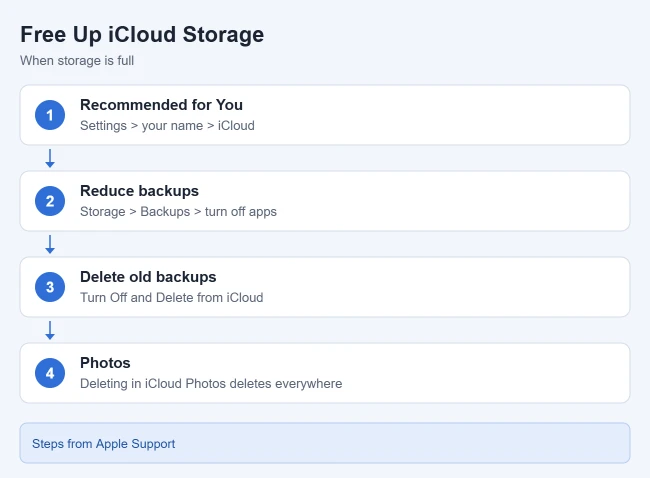
Apple suggests these ways to free up space (or you can buy more storage with iCloud+):
- Check recommendations: on iOS 17 or later, go to Settings > your name > iCloud > Recommended for You.
- Make backups smaller: go to Settings > your name > iCloud > Storage (or Manage Account Storage) > Backups, tap your device, and turn off apps you don’t need backed up.
- Delete old backups: in the same Backups list, tap an old device, then tap Turn Off and Delete from iCloud. iCloud backups stay available for 180 days after you turn off or stop using iCloud Backup, and a backup that is being used to restore a device can’t be deleted. On a Mac, go to iCloud > Manage > Backups, select a backup and click the minus (-) button.
- Clean up photos: deleting a photo or video in iCloud Photos deletes it from every device signed in to the same account.
Turning off an app’s backup removes all of that app’s information from iCloud, and deleting a backup also turns off iCloud Backup for that device. Some apps are always backed up and can’t be turned off.
Is iCloud Storage the Same as iPhone Storage?
No. iCloud storage is online space tied to your Apple Account. iPhone storage is the space on the phone itself. To check it, go to Settings > General > iPhone Storage, where the available storage is shown at the top. Apple also suggests backing up photos and videos to iCloud and then removing them from the device to free up iPhone space.
Frequently Asked Questions
How much free iCloud storage do I get?
You get 5 GB of iCloud storage free when you set up iCloud. For more space, you can upgrade to iCloud+.
Can I turn iCloud Backup back on after deleting a backup?
Yes. Deleting a backup turns off iCloud Backup for that device, and you can turn it back on in iCloud settings on the device.
Turning on iCloud Backup on iPad shows where that switch is.
Related Guides
- How to change iCloud settings on iPhone
- How to view iCloud contacts on a computer
- How to transfer data from iPhone to iPhone
Looking for your files themselves? Here’s where to find iCloud Drive on an iPhone.

Matthew Burleigh is the founder, head writer, and editor of Solve Your Tech, which he launched in 2012. He has written technology tutorials since 2008 and worked in IT since 2003, including small-business support, IT management, and consulting. He holds Bachelor’s and Master’s degrees in Computer Science from Arizona State University.
Matthew writes practical guides for Windows, iPhone and iPad, Microsoft Office, Outlook, Google apps, and Android. Solve Your Tech’s guides are checked step by step against the device or app maker’s own documentation and tested on his own devices whenever he has the hardware or software, with clear steps, sources, and update dates.
Read more about Matthew and how Solve Your Tech writes and updates its guides, or report a correction.