To check your Apple or iTunes gift card balance on iPhone, open the App Store, tap your photo, initials, or the My Account button in the top-right corner, and look below your name. A redeemed gift card becomes part of your Apple Account balance, so the amount shown there is what you have left to spend.
These steps match the App Store on iOS 27 and also work on iOS 26 and iOS 18, on iPad, and on Apple Vision Pro. Mac and Windows steps, plus a way to check an Apple Gift Card you haven’t redeemed yet, are further down.
Before You Start
Apple no longer keeps a separate “iTunes balance.” Whether you redeemed an Apple Gift Card, an App Store & iTunes Gift Card, or an older iTunes Store card, the money lands in one pooled Apple Account balance. Apple doesn’t show it card by card.
That means two things for the steps below:
- You need to be signed in to the same Apple Account that redeemed the card. A balance on your partner’s or child’s account won’t show on yours. Not sure which account your iPhone uses? Here is how to find your Apple ID on iPhone.
- If you still have the card and haven’t entered its code, its value isn’t in your account yet. Skip to “How to Check a Card You Haven’t Redeemed.”
How to Check Your Apple Account Balance on iPhone
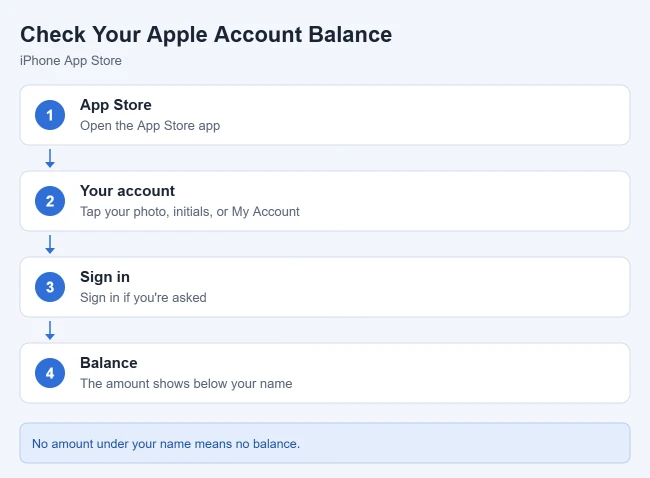
- Open the App Store app on your iPhone.
- Tap your photo, initials, or the My Account button in the top-right corner. The Account screen opens.
- Sign in to your Apple Account if you’re asked.
- Look directly below your name. If you have a balance, the amount appears there.
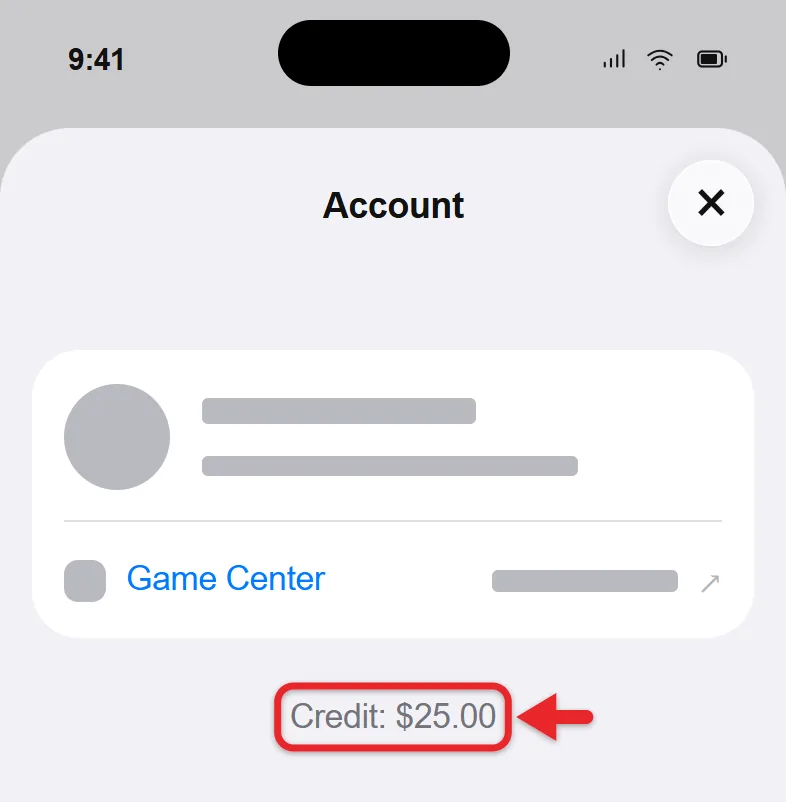
Apple says that if no amount appears below your name, you don’t have a balance. That usually means the card was never redeemed on this account, or the money has already been spent.
Check It in the Wallet App
In some countries and regions, you can also add an Apple Account card to the Wallet app. Open Wallet and tap your Apple Account card to see the balance and recent activity. If you don’t see that card, use the App Store steps above; they work everywhere Apple Account balance is offered.
How to Check a Card You Haven’t Redeemed
What you can check before redeeming depends on the type of card. The card types are pictured in Apple’s guide to identifying your gift card.
| Card type | How to recognize it | Where it works | Checking the balance before redeeming |
|---|---|---|---|
| Apple Gift Card | Colorful Apple logo on a white front | App Store, Apple services, apple.com, and Apple Stores | Use Apple’s gift card balance page |
| App Store & iTunes Gift Card or App Store Card | Usually blue with a wavy pattern and a white Apple logo | App Store, iTunes Store, and Apple services | Worth the amount printed on it until it’s redeemed |
| Apple Store Gift Card | Solid gray, white, silver, or gold front | Apple Stores and apple.com only | The back of the card lists a website for checking the balance |
| Older iTunes Store or Apple Music gift cards | Designs that don’t match the cards above | Redemption steps are printed on the back | Worth the amount printed on it until it’s redeemed |
To check an unredeemed Apple Gift Card:
- Open Apple’s Check your gift card balance page in Safari and tap See the balance of your gift card.
- Sign in with your Apple Account when the page asks.
- Enter the PIN from the back of the card. On a physical card, you may need to peel or gently scratch off the label to see it.
- Read the balance on the screen. Checking doesn’t redeem the card, so you can still give it to someone else.
If you redeem the card, the balance page won’t help anymore. Use the App Store steps instead, because the money now belongs to your Apple Account.
How to Redeem a Gift Card on iPhone
Redeeming moves the card’s value into the Apple Account you’re signed in to. Apple’s gift card redemption guide uses these steps:
- Find the 16-digit code on the back of the card. It begins with “X.” You might need to peel or gently scratch off the label.
- Open the App Store and tap your photo, initials, or the My Account button.
- Tap Redeem Code. Some earlier iOS versions label it Redeem Gift Card or Code.
- Tap Use Camera and hold the card in front of the camera, or tap Enter Code Manually and type the code.
- Tap Redeem.
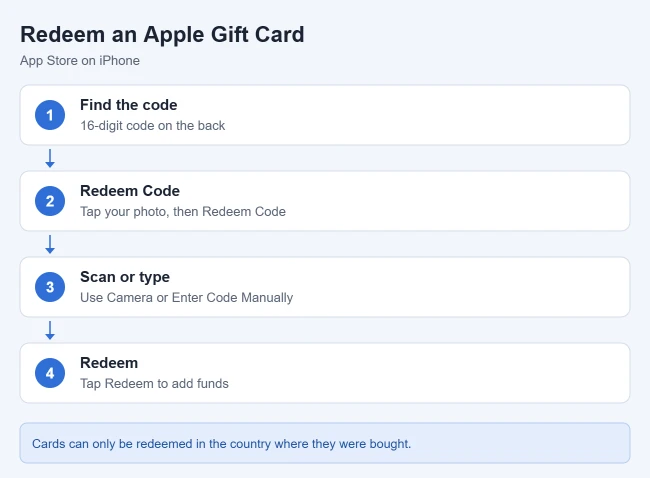
- Go back to the Account screen. The new total appears below your name.
If someone emailed you the gift card, open the email and tap Redeem Now instead. Where Wallet supports it, you can also open Wallet, tap your Apple Account card, tap the More button, and tap Redeem.
Before you redeem, check the name on the Account screen. Apple’s Apple Account balance guide treats the balance as belonging to that one account, and there’s no button to move it to another person later. If you planned to give the card away, don’t redeem it on your own phone.
Other Ways to Check Your Balance
The balance is tied to your account, not your iPhone, so any device signed in to the same Apple Account shows the same number.
- iPad or Apple Vision Pro: open the App Store, tap your photo, initials, or My Account, and look below your name.
- Mac: open the App Store. If you see Sign In at the bottom of the sidebar, click it and sign in. Your balance appears below your name at the bottom of the sidebar.
- Windows PC: open the Apple Music app or the Apple TV app, then click your name or Sign In at the bottom of the sidebar. The balance appears below your name.
If Your Card Won’t Redeem
Apple’s help page for gift cards that won’t redeem lists four common messages:
- “Card is not valid”: make sure it isn’t an Apple Store Gift Card (gray, white, silver, or gold), which can’t be used in the App Store. Enter the code manually, using the code that begins with “X,” not the serial number. Watch for look-alike characters such as B and 8, D and O, G and 6, S and 5, and Z and 2.
- “Card has already been redeemed”: you may have redeemed it already. Sign out of the App Store on all your devices, sign back in, and check your balance again.
- “Card is not activated”: the store that sold it may not have activated it at checkout. Take the card and receipt back to that retailer.
- “Must be redeemed in a different country or region”: gift cards only work in the country or region where they were bought. Return a physical card to the retailer.
If the code is scratched or unreadable, contact Apple Support. Have photos of the front and back of the card, the receipt, and the serial number from the back of the card (it starts with GCA, PBH, or EPY).
If Your Balance Looks Wrong
- Sign out of the App Store, Apple Music app, or Apple TV app, then sign back in. If you need a full sign-out, follow the steps for signing out of your Apple Account on iPhone.
- Check the balance on the Account screen again.
- If it’s still lower than you expect, look for something that spent it. Subscriptions such as iCloud+ or Apple Music renew automatically and can be paid from your balance. Here’s how to see your purchase history and subscriptions on iPhone.
- Make sure you’re on the right account. A card redeemed on another Apple Account won’t show up on yours.
What Your Balance Can and Can’t Buy
Apple’s list of what you can buy with your Apple Account balance includes:
- Apps, games, and in-app purchases from the App Store
- Music, movies, TV shows, and books from the iTunes Store, Apple TV app, and Apple Books
- Subscriptions such as Apple Music, Apple Arcade, Apple TV, and iCloud+, plus many app subscriptions
- Where Apple Gift Card is sold, Apple products and accessories at apple.com, in an Apple Store, or in the Apple Store app
There are limits:
- You can’t use your balance to send gifts or buy gift cards.
- AppleCare+ and some other recurring charges can’t be started with your balance. Once another payment method is on file, a renewal can come out of your balance if it covers the whole charge.
- Some purchases still require a credit card on file even when your balance pays for them. To add or change that card, update your Apple Account payment method.
- Family Sharing members can’t spend your balance. Money you add is available only to you.
How to Add Money to Your Balance
You can also top up the balance without a gift card. In the App Store, tap your photo or initials, tap Add Money, and pick an amount. Apple’s add money guide says you can tap Set Up Auto Reload to refill it automatically where that option is offered. To stop it later, go back to Add Money and tap Turn Off Auto Reload.
Watch Out for Gift Card Scams
Apple gift cards can only buy Apple products and services. Anyone who asks you to pay a bill, tax, fine, or “tech support” fee with an Apple or iTunes gift card is running a scam, according to Apple’s page about gift card scams. Never read or send the code on the back of a card to someone you don’t know well, and only type a code or PIN into Apple’s own apps and website.
If you already shared a code, contact Apple right away at 800-275-2273 in the US and say “gift cards” when prompted, then report the scam to the Federal Trade Commission at reportfraud.ftc.gov.
Frequently Asked Questions
Can I check my balance without the App Store?
Yes. On iPhone, the Wallet app shows it on your Apple Account card in supported countries. On a Mac or Windows PC signed in to the same Apple Account, use the App Store (Mac) or the Apple Music or Apple TV app (Windows).
Can I get cash back for my Apple gift card balance?
No. Gift cards and unused Apple Account balance can’t be redeemed or returned for cash, except where the law requires it. In those places, you contact Apple Support with the primary email address for your Apple Account.
Can I move my balance to another Apple Account?
No. Once a card is redeemed, the money stays with the account that redeemed it. If you want to give a card to someone, give it to them before you enter the code.
Do Apple gift cards expire?
Apple’s US gift card terms don’t list an expiration date, and a redeemed balance stays on your Apple Account until you spend it.
Why do I need a zero balance to change my country?
Some account changes, like switching your App Store country or region, require a balance of zero. Spend the remaining balance or wait for pending refunds. If what’s left is less than the price of a single item, contact Apple Support.
Where is the code on an Apple gift card?
On the back of the card, under a label you may need to peel or scratch off. The redemption code is 16 characters and begins with “X.” The separate serial number (starting with GCA, PBH, or EPY) is only used when contacting Apple Support.
If your balance runs out, purchases go to the payment method on file, so it’s worth checking that card is current.
To keep that balance from being spent without your OK, require your password for every purchase.

Matthew Burleigh is the founder, head writer, and editor of Solve Your Tech, which he launched in 2012. He has written technology tutorials since 2008 and worked in IT since 2003, including small-business support, IT management, and consulting. He holds Bachelor’s and Master’s degrees in Computer Science from Arizona State University.
Matthew writes practical guides for Windows, iPhone and iPad, Microsoft Office, Outlook, Google apps, and Android. Solve Your Tech’s guides are checked step by step against the device or app maker’s own documentation and tested on his own devices whenever he has the hardware or software, with clear steps, sources, and update dates.
Read more about Matthew and how Solve Your Tech writes and updates its guides, or report a correction.