
How to Fix Yahoo Mail Not Working on iPhone
If Yahoo Mail isn’t working on your iPhone, first sign in to Yahoo Mail in a web browser to make sure your account and password …
How-to guides for iPhone, iPad, Apple Watch, and Android phones and tablets.
If Yahoo Mail isn’t working on your iPhone, first sign in to Yahoo Mail in a web browser to make sure your account and password …

To turn off the AirPods “left behind” notification on an iPhone, open the Find My app, tap Devices, tap your AirPods, tap Notify When Left …

To screen record on an iPhone, open Control Center, tap the Screen Recording button (a solid circle inside a ring), and wait for the 3-second …

To change your iPhone’s name, open Settings, tap General, tap About, then tap Name. Clear the old name and type a new one. That same …

To remove “Sent from my iPhone,” open Settings > Apps > Mail > Signature, then delete the text or replace it with your own sign-off. …

To see which iPhone apps work with Siri, open Settings, tap Siri (called Apple Intelligence & Siri on some iPhones and iOS versions), scroll to …

To hide images in Firefox on an iPhone, tap the menu button (three horizontal lines), tap Settings, tap Browsing, and turn on Block Images. Firefox …

To delete a song from your iPhone, open the Music app, touch and hold the song, and tap Remove Download. That frees up storage but …

To use the Mail app on an iPhone, add your email account in Settings > Apps > Mail > Mail Accounts > Add Account, then …

To start a group text on iPhone, open Messages, tap Compose, add two or more people in the To field, type your message, and tap …

To back up an iPhone to iCloud, open Settings, tap your name, tap iCloud, tap iCloud Backup, and turn on Back Up This iPhone. Tap …

To check your Apple or iTunes gift card balance on iPhone, open the App Store, tap your photo, initials, or the My Account button in …

To turn flash notifications on or off on an iPhone, open Settings, tap Accessibility, tap Audio & Visual, tap Flash for Alerts, and switch Flash …

To stop your iPhone from flipping selfies, go to Settings > Camera and turn on Mirror Front Camera. Your selfies then save the way they …

To hard reset an iPhone without losing anything, press and quickly release volume up, press and quickly release volume down, then press and hold the …

A bell with a line through it next to a text conversation on your iPhone means that conversation is muted. Hide Alerts is turned on …

Your iPhone has a variety of different notification settings that can alert you to information about a particular app. The badge is one such option, although it may not be immediately obvious what it means. Our article will answer questions that you have about iPhone badges.
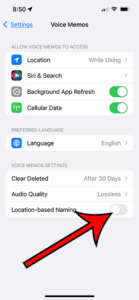
To stop your iPhone 13 from naming voice memos after your location, open Settings, tap Apps, tap Voice Memos, and turn off Location-based Naming. On …

To stop YouTube videos from auto playing on iPhone, open a video in the YouTube app and tap the Autoplay switch at the top of …

To hide a picture on an iPhone 13, open the Photos app, touch and hold the photo, tap Hide, and confirm. The picture leaves your …

To turn off sound in Pokémon GO, tap the Main Menu button (the Poké Ball at the bottom of the map), tap Settings at the …

To delete a Bluetooth device on an iPhone 13, open Settings > Bluetooth, tap the i (More Info) button next to the device, tap Forget …

To turn auto-correction on or off on an iPhone, open Settings, tap General, tap Keyboard, and use the Auto-Correction switch. The same screen has the …

To turn dictation on or off on an iPhone 13, open Settings, tap General, tap Keyboard, and switch Enable Dictation on or off. When it’s …

To bookmark or favorite a website in Safari on iPhone, open the page, tap the Page Menu button in the address bar, tap Add Bookmark …

To share an Amazon product from your iPhone, open the product page in the Amazon Shopping app, tap the Share icon in the top-right corner …

To move Safari’s address bar to the top on iPhone, open Settings > Apps > Safari, scroll to Tabs, and choose Top. On iOS 18 …

To block an email sender on an iPhone 13, open one of their messages in the Mail app, tap their name at the top, tap …

Your iPhone usually keeps dimming for one of two reasons. Auto-Brightness changes the screen to match the light around you, and Auto-Lock dims and then …
