
How to Turn Off Shadows in MTG Arena
To turn off shadows in MTG Arena, click the gear icon (Adjust Options) at the top right, choose Graphics, set Quality Level to Custom, and …
How-to guides for Microsoft Excel, Word, Outlook, PowerPoint, Windows, Photoshop, and other apps and software.
To turn off shadows in MTG Arena, click the gear icon (Adjust Options) at the top right, choose Graphics, set Quality Level to Custom, and …
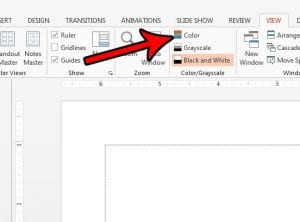
A PowerPoint presentation usually looks black and white because it is open in Grayscale or Black and White view. Click the View tab and, in …

To concede in Magic: The Gathering Arena, open the options menu during a game by clicking the gear icon at the top right (or pressing …

To insert an arrow in Excel, go to the Insert tab, select Shapes, and choose Line Arrow under Lines. Then click and drag on the …

To stop websites from asking for your location in Firefox, open Settings, go to the Permissions section, click Settings next to Location, check Block new …

To calculate age from a birthdate in Excel, put the birthdate in cell A2 and type =DATEDIF(A2,TODAY(),”Y”) in another cell. Excel shows the person’s age …

To sort by date in Excel Online (Excel for the web), click a cell in the date column, go to the Data tab, and click …
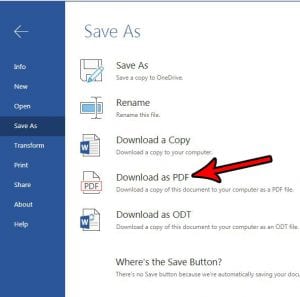
To save as a PDF from Word Online (Word for the web), select File > Export > Download as PDF, then select Download in the …

To hide a column in Excel Online, click the column letter to select it, right-click it, and choose Hide. A double line between the neighboring …
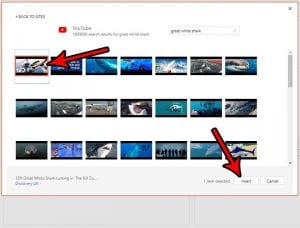
To add a YouTube video in PowerPoint Online, copy the video’s link from YouTube, select your slide, and choose Insert > Video > Online Video. …

The Page Ends button no longer appears in Word Online, which Microsoft now calls Word for the web. Microsoft replaced it with Separate Pages. To …

To remove a worksheet tab in Excel Online, right-click the sheet’s tab at the bottom of the workbook and choose Delete. The tab disappears along …

To combine PDFs in Adobe Acrobat, open All tools > Combine files (or Menu > Combine files on Windows and File > Combine files on …
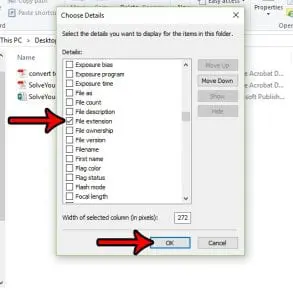
To add another column in File Explorer, switch the folder to Details view, right-click any column heading, such as Name or Date modified, and click …
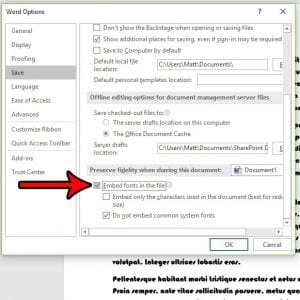
To make sure fonts are embedded when you save a Word document as a PDF, go to File > Save a Copy (or Save As), …

If your Excel columns are labeled 1, 2, 3 instead of A, B, C, the R1C1 reference style option is turned on. To switch back …

To return a worksheet to Normal view in Excel, click the View tab and click Normal in the Workbook Views group, or click the Normal …

To keep a trailing zero in Excel, so 2.50 doesn’t turn into 2.5, select the cells and click Increase Decimal on the Home tab until …
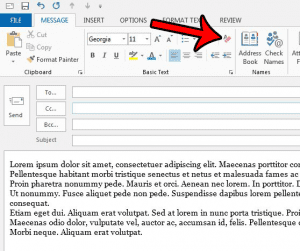
To remove formatting from an email in classic Outlook, select the text in the message you’re writing, then select Clear All Formatting in the Basic …
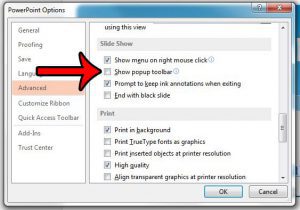
To hide the toolbar in PowerPoint’s full-screen slide show, select File > Options > Advanced, scroll to Slide Show, clear Show popup toolbar, and select …

To put a bulleted list in one Excel cell, double-click the cell, press Alt+7 on the number pad (or use Insert > Symbol with character …

To stop QuickBooks from beeping every time you enter an invoice, open QuickBooks Desktop, click Edit > Preferences, select General, and on the My Preferences …

To delete a picture in Word, click the picture once to select it, then press the Delete key. On a Mac, Microsoft says to press …

To open the Navigation pane in Word, press Ctrl + F, or go to the View tab and check Navigation Pane. The pane opens on …

To put column A on the right side in Excel, switch the sheet to right-to-left. In Excel for Windows, go to File > Options > …

This post contains affiliate links. As an Amazon Associate, solveyourtech.com earns from qualifying purchases, at no extra cost to you. To disable JavaScript in Adobe …

To enable scrolling by default in Adobe Acrobat Reader, open Preferences, select Page Display, set Page Layout to Single Page Continuous, and click OK. If …

To save individual pages from a PDF in Adobe Acrobat, open the PDF, select All tools > Organize pages, select the pages you want, and …

To exit full screen mode in Photoshop, press Esc, or press F until the menu bar, panels, and document tabs come back. If you can …

If the cell cursor feels slow or laggy in Excel, turn off Excel’s animations: click File > Options > Accessibility and clear Provide feedback with …