
How to Create a Yahoo Mail Account
To create a Yahoo Mail account, go to Yahoo’s sign-up page (login.yahoo.com, then Create an account) and enter your name, the Yahoo email address you …
How-to guides and tutorials about topics related to the Yahoo Mail email service and using it on your phone or computer.
To create a Yahoo Mail account, go to Yahoo’s sign-up page (login.yahoo.com, then Create an account) and enter your name, the Yahoo email address you …

To view your Yahoo Mail inbox, go to mail.yahoo.com, sign in with your Yahoo email address and password, and click Inbox in the folder list …

If Yahoo Mail isn’t working on your iPhone, first sign in to Yahoo Mail in a web browser to make sure your account and password …
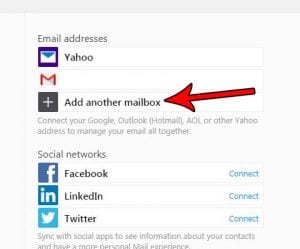
To add another email account to Yahoo Mail on a computer, click More options (the three dots), choose Settings, click Mailboxes, then click Add mailbox …
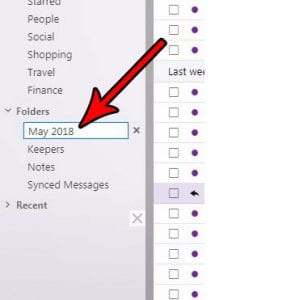
To create a new folder in Yahoo Mail on a computer, click Folders in the left pane, click New Folder, type a name at the …
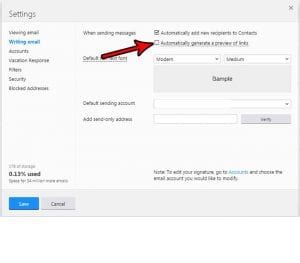
To stop a link preview from going out with a Yahoo Mail message, delete the preview card from your draft before you send, or switch …
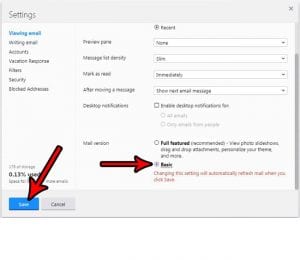
To switch Yahoo Mail to Basic Mail on a computer, open Settings, click Switch to Basic Mail near the bottom of the left-hand list, and …
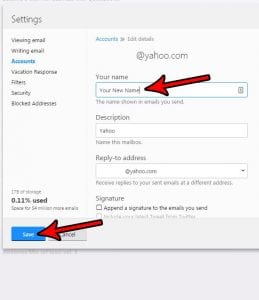
“Null null” in front of your Yahoo address almost always means the sending name on your Yahoo Mail account is empty. To fix it, sign …
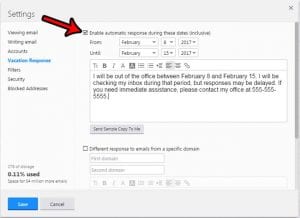
To set an out of office reply in Yahoo Mail, open Yahoo Mail in a web browser on a computer, click More below your folders, …