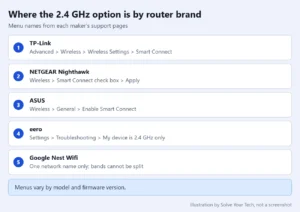
How to Change Your Wi-Fi to 2.4 GHz on Your Router
You usually can’t flip a whole router to 2.4 GHz with one button, and you rarely need to. A dual-band router already broadcasts 2.4 GHz …
How-to guides and tutorials about topics related to routers that you use in your network at home or work.
You usually can’t flip a whole router to 2.4 GHz with one button, and you rarely need to. A dual-band router already broadcasts 2.4 GHz …
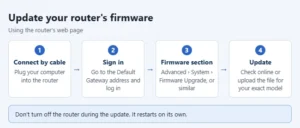
To update router firmware, open the router’s phone app or its settings page in a web browser, sign in as the administrator, and find Firmware …
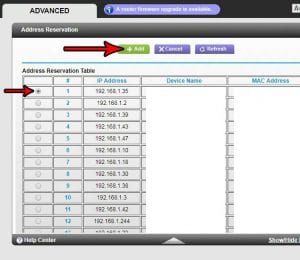
To reserve an IP address on a Netgear N600, sign in to the router at http://www.routerlogin.net, select ADVANCED > Setup > LAN Setup, click Add …

To change the admin password on a Netgear N600 router, go to routerlogin.net in a web browser on a device connected to the router, sign …

To turn off the guest network on a Cisco E1000 router, open the Cisco Connect software on the computer you used to set up the …