Skip to content
Solve Your Tech
  • Windows
    • Settings, Desktop & Accounts
    • Files, Devices & Troubleshooting
  • iPhone & iPad
    • iPhone Settings & Basics
    • iPhone Messages, Photos & Apps
    • iPad
    • Apple Watch & AirPods
  • Android
  • Microsoft Office
    • Excel
    • Word
    • Outlook
    • PowerPoint
  • Google
    • Chrome
    • Docs
    • Sheets
    • Slides
    • Gmail
    • Google Drive
  • Home Tech
    • Fire TV
    • Roku & Apple TV
    • Printers & Ink
    • Wi-Fi & Smart Home
  • More
    • Firefox
    • Microsoft Edge
    • Photoshop
    • Social & Other Apps
    • Mac
    • Reviews & Buying Advice
    • Store
WindowsiPhoneAndroidExcelWordOutlookGoogleChrome

Mobile Devices

How-to guides for iPhone, iPad, Apple Watch, and Android phones and tablets.

Messages conversation detail with a Spotify song link preview highlighted, a sample song title, open.spotify.com, play control, and gray artwork and conversation placeholders

How to Share a Song From Spotify in a Text Message on iPhone

November 10, 2026June 22, 2017 by Matthew Burleigh

To text a Spotify song from an iPhone, tap the three dots next to the song, tap Share, then tap Messages. Pick the person, add …

Read More

Categories Mobile Devices
Messages notification settings in the Apple Watch app with Custom and Notifications Off selected

How to Turn Off Notifications on Apple Watch (Messages, Calendar, and More)

November 9, 2026June 22, 2017 by Matthew Burleigh

To turn off text message notifications on Apple Watch, open the Apple Watch app on your iPhone, tap My Watch > Notifications > Messages, tap …
Read More

Categories Mobile Devices
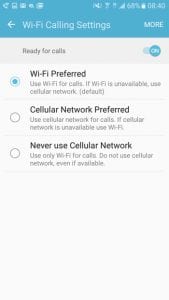
how to change wi fi calling android marshmallow

Android SIM Card Out of Service? Check Your Wi-Fi Calling Setting

November 10, 2026June 20, 2017 by Matthew Burleigh

If your Android phone says the SIM card is out of service, or shows No service, check the Wi-Fi calling preference first. Older Samsung phones …

Read More

Categories Mobile Devices
Google Messages Message organization with Auto-delete OTPs after 24 hrs switched off

How to Stop Your Android Phone from Deleting Old Messages

November 9, 2026June 14, 2017 by Matthew Burleigh

To stop an Android phone from deleting old texts, find the auto-delete setting in the texting app you use and turn it off. In Samsung …

Read More

Categories Mobile Devices
Google Chrome listing in the iPhone App Store with the Get button

How to Install Google Chrome and Other Google Apps on iPhone

November 10, 2026June 1, 2017 by Matthew Burleigh

To install Google Chrome on an iPhone, open the App Store, tap Search, type Google Chrome, and tap Get on the listing from Google LLC. …

Read More

Categories Mobile Devices
iPhone Camera settings with Preserve Settings option

How to Save the Camera Mode on an iPhone (iPhone 7 and Newer)

November 9, 2026May 31, 2017 by Matthew Burleigh

To make the iPhone Camera app open in the last mode you used, go to Settings > Camera > Preserve Settings and turn on Camera …

Read More

Categories Mobile Devices
Where the Show Holiday Events switch is on newer and older versions of iOS

How to Show Holiday Events in the Memories Section of the iPhone Photos App

November 9, 2026May 26, 2017 by Matthew Burleigh

To show holiday events in the Memories section of the iPhone Photos app, open Photos, tap Collections, tap your account in the top-right corner, and …

Read More

Categories Mobile Devices
Apple Watch VoiceOver settings screen with the VoiceOver switch turned on

How to Turn On VoiceOver on Apple Watch

November 9, 2026May 25, 2017 by Matthew Burleigh

To turn on VoiceOver on Apple Watch, open Settings on the watch, tap Accessibility > VoiceOver, and turn on VoiceOver. You can also ask Siri, …

Read More

Categories Mobile Devices
Samsung Repeat notification alerts settings with On enabled, Apps to repeat alerts set to None and a 3 minute Repeat interval, highlighted in red

How to Turn On Notification Reminders on Android (Samsung)

November 10, 2026May 17, 2017 by Matthew Burleigh

To turn on notification reminders on a Samsung Galaxy, open Settings > Notifications > Advanced settings and turn on Notification reminders. On older models, go …

Read More

Categories Mobile Devices
Card showing Firefox menu, Settings, Autofills and Passwords, and Saved Passwords steps on iPhone

How to Save and Find Passwords in Firefox on iPhone

November 9, 2026May 16, 2017 by Matthew Burleigh

To save passwords in Firefox on an iPhone, tap the menu button, tap Settings, choose Autofills & Passwords, and turn on Save Passwords. To see …

Read More

Categories Mobile Devices
Comparison of turning off Siri triggers on Apple Watch and turning off Siri on iPhone

How to Turn Off Siri on Apple Watch

November 12, 2026May 11, 2017 by Matthew Burleigh

To turn off Siri on your Apple Watch only, open Settings on the watch, tap Siri, turn off Raise to Speak and Press Digital Crown, …

Read More

Categories Mobile Devices
Watch app Maps Turn Alerts detail with Driving and Driving with CarPlay off while Walking and Cycling remain on

How to Turn Off Maps Directions on Apple Watch

November 10, 2026May 4, 2017 by Matthew Burleigh

To turn off Maps directions on your Apple Watch, open the Watch app on your iPhone, tap My Watch, tap Maps, and turn off the …

Read More

Categories Mobile Devices
Where to see how many Pokemon you have caught in Pokemon GO: Trainer Profile, Total Activity, Collector medal, Pokedex

How Many Pokémon Have I Caught in Pokémon GO?

October 20, 2026April 12, 2017 by Matthew Burleigh

To see how many Pokémon you have caught in Pokémon GO, tap your Trainer portrait in the bottom-left corner of the map and scroll down …

Read More

Categories Mobile Devices
Steps to block in-app purchases for Pokemon GO on iPhone with Screen Time, plus the Android Play Store setting

How to Block In-App Purchases in Pokémon GO on iPhone

October 20, 2026April 11, 2017 by Matthew Burleigh

Pokémon GO has no purchase lock of its own, so you block in-app purchases through the phone. On an iPhone with iOS 27, go to …

Read More

Categories Mobile Devices
Steps to put an Egg in an incubator in Pokemon GO: main menu, Pokemon, Eggs, Incubate

How to Put an Egg in an Incubator in Pokémon GO

November 10, 2026April 10, 2017 by Matthew Burleigh

To put an Egg in an incubator in Pokémon GO, tap the Poké Ball, tap Pokémon, and switch to the Eggs tab. Tap an Egg, …

Read More

Categories Mobile Devices
Google Play Protect screen on an Android phone showing the last scan time and a Scan button

5 Common Types of Phone Viruses and How to Know If You Have One

November 10, 2026April 7, 2017 by Matthew Burleigh

The five most common phone threats today are fake or trojan apps, spyware and stalkerware, adware, phishing links sent by text or email, and fake …

Read More

Categories Mobile Devices
Spotify mobile menu detail showing Share and Lyrics On, with the Lyrics row outlined in red and an arrow pointing to it

How to Turn Off Lyrics in the Spotify iPhone App

November 10, 2026April 3, 2017 by Matthew Burleigh

To turn off lyrics in the Spotify iPhone app, play a song, tap the Now Playing bar, tap the three dots in the top-right corner, …

Read More

Categories Mobile Devices
iPhone Photos Crop screen with the crop frame, Rotate and Flip buttons, aspect ratio button and Done

How to Rotate a Picture from Portrait to Landscape on iPhone

November 9, 2026March 20, 2017 by Matthew Burleigh

To change a picture from portrait to landscape on an iPhone, open the photo in Photos, tap Edit, tap Crop, then tap the Rotate button. …

Read More

Categories Mobile Devices
Apple Watch Show Complication Data controls with the category on and one example app, Activity, turned off and outlined in red

How to Delete or Change a Complication on Apple Watch

November 10, 2026February 14, 2017 by Matthew Burleigh

To delete a complication on Apple Watch, touch and hold the watch face, tap Edit, swipe left to the complications screen, tap the complication, and …

Read More

Categories Mobile Devices
Open Camera while locked. Wake the phone: Bring up the Lock Screen. Swipe left: Start on an empty part of the screen. Alternative shortcut: Hold the camera icon if present. Take the photo: Use the shutter or a volume button.

How to Open the Camera From the iPhone Lock Screen

November 10, 2026February 13, 2017 by Matthew Burleigh

To open Camera from the iPhone Lock Screen, swipe left on the Lock Screen. On iPhones with Face ID, you can also touch and hold …

Read More

Categories Mobile Devices
Card with the steps to deny location access for all Safari websites on iPhone

How to Stop Safari Websites from Using Your Location on an iPhone

November 9, 2026February 3, 2017 by Matthew Burleigh

To stop Safari websites from using your location on an iPhone, open Settings > Apps > Safari, tap Location, and choose Deny. For a stronger …

Read More

Categories Mobile Devices
Steps to turn off dial pad tones on Android: Phone app, More, Settings, Sounds and vibration, Dial pad tones

How to Turn Off Dial Pad Tones on Android

October 20, 2026February 2, 2017 by Matthew Burleigh

To turn off dial pad tones on Android, open the Phone app, tap More (the three dots), tap Settings, tap Sounds and vibration, and turn …

Read More

Categories Mobile Devices
Steps to check Pokemon GO cellular data use in iPhone Settings, Cellular, and reset statistics

How Much Data Does Pokémon GO Use? How to Check on iPhone

October 20, 2026January 11, 2017 by Matthew Burleigh

Pokémon GO has no official data-per-hour figure, so the most accurate number is the one your iPhone records. Open Settings > Cellular, scroll to the …

Read More

Categories Mobile Devices
Four Apple Watch Activity control details showing Stand Reminders, Daily Coaching, Goal Completions and Special Challenges switched off

How to Turn Off Activity Notifications on Apple Watch

November 10, 2026January 10, 2017 by Matthew Burleigh

To turn off Activity notifications on Apple Watch, open Settings on the watch, tap Activity, and switch off the reminders and alerts you no longer …

Read More

Categories Mobile Devices
Illustration of the serial-number location inside an empty Apple Watch band slot and the area outlined in red

How to Find Your Apple Watch Serial Number (and Change Its Name)

November 10, 2026January 5, 2017 by Matthew Burleigh

To find your Apple Watch serial number, open Settings on the watch, tap General > About, and scroll to Serial Number. It’s also in the …

Read More

Categories Mobile Devices
Steps to turn off music and sounds in Super Mario Run on iPhone

How to Turn Off Sounds in Super Mario Run on an iPhone

November 9, 2026December 22, 2016 by Matthew Burleigh

This post contains affiliate links. As an Amazon Associate, solveyourtech.com earns from qualifying purchases, at no extra cost to you. To turn off sounds in …

Read More

Categories Mobile Devices
Apple Watch Orientation screen with Wrist and Digital Crown choices

How to Change the Wrist Setting on Apple Watch

November 9, 2026December 20, 2016 by Matthew Burleigh

To switch your Apple Watch to your other wrist, open Settings on the watch, tap General, tap Orientation, and choose Left or Right under Wrist. …

Read More

Categories Mobile Devices
Spotify desktop profile menu with Private session checked and the blue padlock beside a concealed profile picture

How to Change Spotify Privacy Settings (Private Session)

November 10, 2026December 16, 2016 by Matthew Burleigh

To keep your Spotify listening private, turn on a Private Session. On your phone, tap your profile picture, go to Settings and privacy › Privacy …

Read More

Categories Mobile Devices
Apple Watch Bluetooth settings showing connected headphones

How to Pair (or Remove) Bluetooth Headphones on Apple Watch

November 9, 2026December 16, 2016 by Matthew Burleigh

To pair Bluetooth headphones with an Apple Watch, put the headphones in pairing mode, open Settings on the watch, tap Bluetooth, and tap the headphones …

Read More

Categories Mobile Devices
Steps to delete the Pokemon GO app from an iPhone: hold icon, Remove App, Delete App, Delete

How to Delete Pokémon GO From Your iPhone (Without Losing Progress)

October 20, 2026December 12, 2016 by Matthew Burleigh

To delete Pokémon GO from your iPhone, touch and hold the Pokémon GO icon, tap Remove App, tap Delete App, and then tap Delete. Deleting …

Read More

Categories Mobile Devices
Older posts
Newer posts
← Previous Page1 … Page21 Page22 Page23 … Page27 Next →

Join Our Free Newsletter

Featured guides and deals

You may opt out at any time.
Read our Privacy Policy

  • iPhone
  • iPad
  • Apple Watch & AirPods
  • Google Docs
  • Google Sheets
  • Google Slides
  • Google Chrome
  • Microsoft Excel
  • Microsoft Outlook
  • Microsoft Powerpoint
  • Microsoft Windows
  • Microsoft Word
  • Firefox
  • Photoshop
  • Android
  • Home Tech
  • Google
  • Microsoft Edge

info@solveyourtech.com
4845290651
2138 W. Union Blvd.
#1037
Bethlehem, PA 18018
United States

  • SolveYourTech YouTube
  • SolveYourTech Facebook
  • SolveYourTech Instagram
  • SolveYourTech Twitter
  • SolveYourTech Pinterest
  • SolveYourTech LinkedIn
  • SolveYourTech TikTok
  • Newsletter
  • Affiliate Disclaimer
  • Terms of Use
  • Privacy Policy
  • Contact
  • About Us
© SolveYourTech.com 2026We use Microsoft Clarity and Google Analytics to see how visitors use this site. See our Privacy Policy for details.
  • Windows
    • Settings, Desktop & Accounts
    • Files, Devices & Troubleshooting
  • iPhone & iPad
    • iPhone Settings & Basics
    • iPhone Messages, Photos & Apps
    • iPad
    • Apple Watch & AirPods
  • Android
  • Microsoft Office
    • Excel
    • Word
    • Outlook
    • PowerPoint
  • Google
    • Chrome
    • Docs
    • Sheets
    • Slides
    • Gmail
    • Google Drive
  • Home Tech
    • Fire TV
    • Roku & Apple TV
    • Printers & Ink
    • Wi-Fi & Smart Home
  • More
    • Firefox
    • Microsoft Edge
    • Photoshop
    • Social & Other Apps
    • Mac
    • Reviews & Buying Advice
    • Store