A downloaded Audible audiobook takes about 15 MB of iPhone storage per hour in Standard quality and about 30 to 60 MB per hour in High quality. A typical 10-hour book needs roughly 150 MB in Standard or 300 to 600 MB in High, and Dolby Atmos downloads can be larger. To see exactly how much space Audible is using, open Settings > General > iPhone Storage and tap Audible.
This guide covers the current Audible app for iPhone on iOS 26 and iOS 27. Audible doesn’t publish file sizes for its downloads, so the size figures below are estimates worked out from bitrates, and the size of any single book depends on its length and the download quality you pick. The settings paths match Audible’s download settings help page.
What Decides the Size of an Audible File
Three things control how much room a book takes on your phone:
- Length. This matters most. A 3-hour novella and a 45-hour fantasy epic in the same quality differ in size by about 15 times. The length is shown on each book’s page in the Audible store and in your Library.
- Download quality. The Audible app downloads books as Standard or High quality files. High quality files sound slightly fuller and are larger. Standard is the smaller choice.
- Dolby Atmos. Some titles carry a Dolby Atmos badge. When spatial audio is on, those titles download in a format that Audible says results in larger file sizes.
Estimated Audible File Sizes by Length
File size is the bitrate (how much audio data is stored per second) multiplied by the running time. One hour of audio works out to about 14 MB at 32 kbps, 29 MB at 64 kbps, and 58 MB at 128 kbps. Audible doesn’t list the bitrate for each quality setting, and reported bitrates vary from title to title. Standard downloads tend to sit at the low end of this range, and High quality downloads at the middle or top.
| Book length | About 32 kbps | About 64 kbps | About 128 kbps |
|---|---|---|---|
| 1 hour | 14 MB | 29 MB | 58 MB |
| 5 hours | 72 MB | 144 MB | 288 MB |
| 10 hours | 144 MB | 288 MB | 576 MB |
| 20 hours | 288 MB | 576 MB | 1.2 GB |
| 40 hours | 576 MB | 1.2 GB | 2.3 GB |
For planning, a quick rule of thumb works well: multiply the book’s length in hours by 15 MB for Standard, or by 30 to 60 MB for High. A 12-hour book is about 180 MB in Standard and 360 to 720 MB in High.
How to See How Much Space Audible Uses on Your iPhone
The Audible app doesn’t show a size for each book, but your iPhone shows the total for all of your downloads.
- Open the Settings app on your iPhone.
- Tap General, then tap iPhone Storage. A colored bar at the top shows used and free space, and your apps are listed below it from largest to smallest. The list can take a few seconds to load.
- Scroll to Audible and tap it. App Size is the app itself. Documents & Data is mostly your downloaded audiobooks, so this is the number to watch.
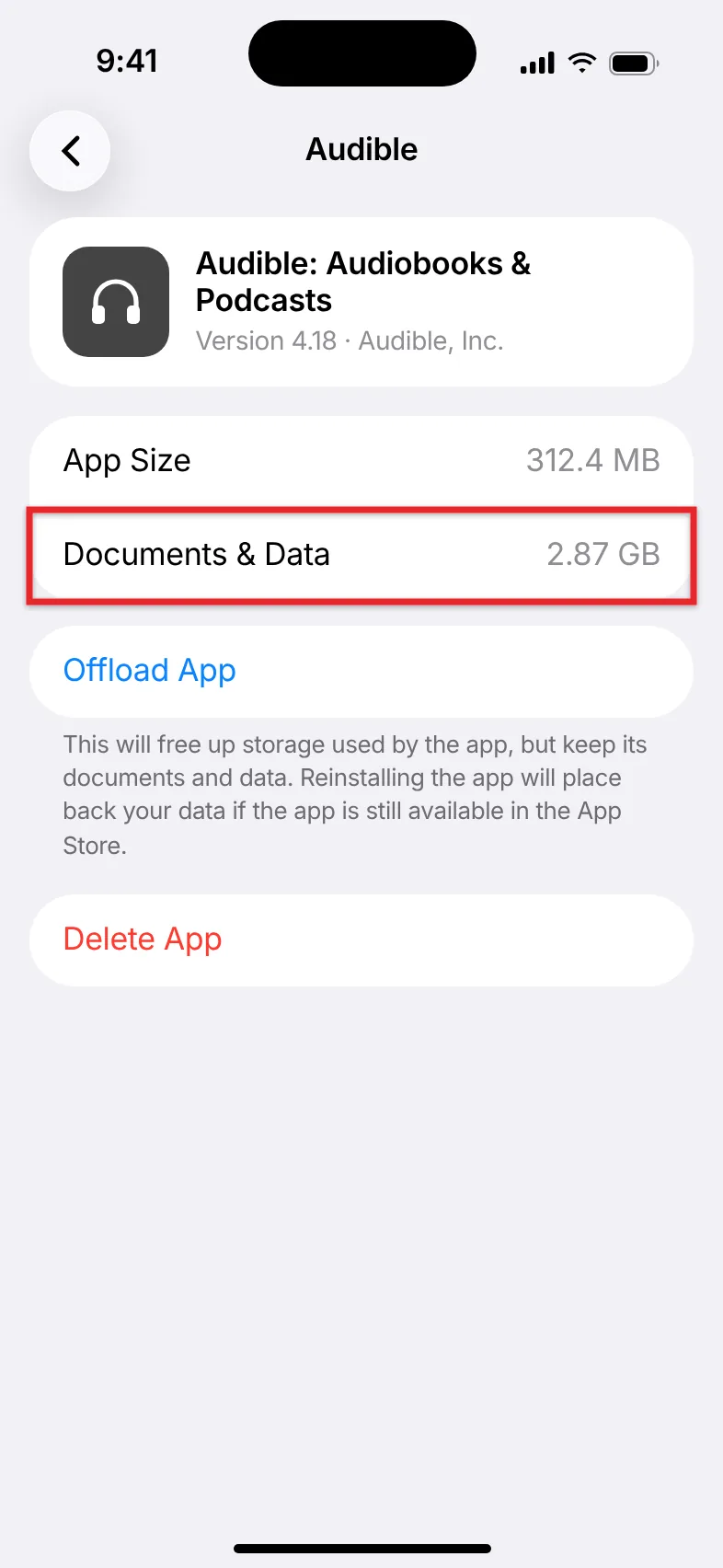
To estimate the size of one book, note the Documents & Data figure, download or remove that book in the Audible app, and check again. The difference is the book’s size. Apple explains the rest of this screen in its guide to checking storage on iPhone.
If you’re short on space for other reasons, read about checking and freeing up iPhone storage, including Apple’s recommendations and other large apps.
How to Make Audible Downloads Smaller
Switching to Standard quality is the main way to shrink new downloads.
- Open the Audible app and tap Profile at the bottom of the screen.
- Tap the Settings gear icon.
- Tap Data & Storage.
- Under download quality, tap Standard. Books you download from now on use the smaller format.
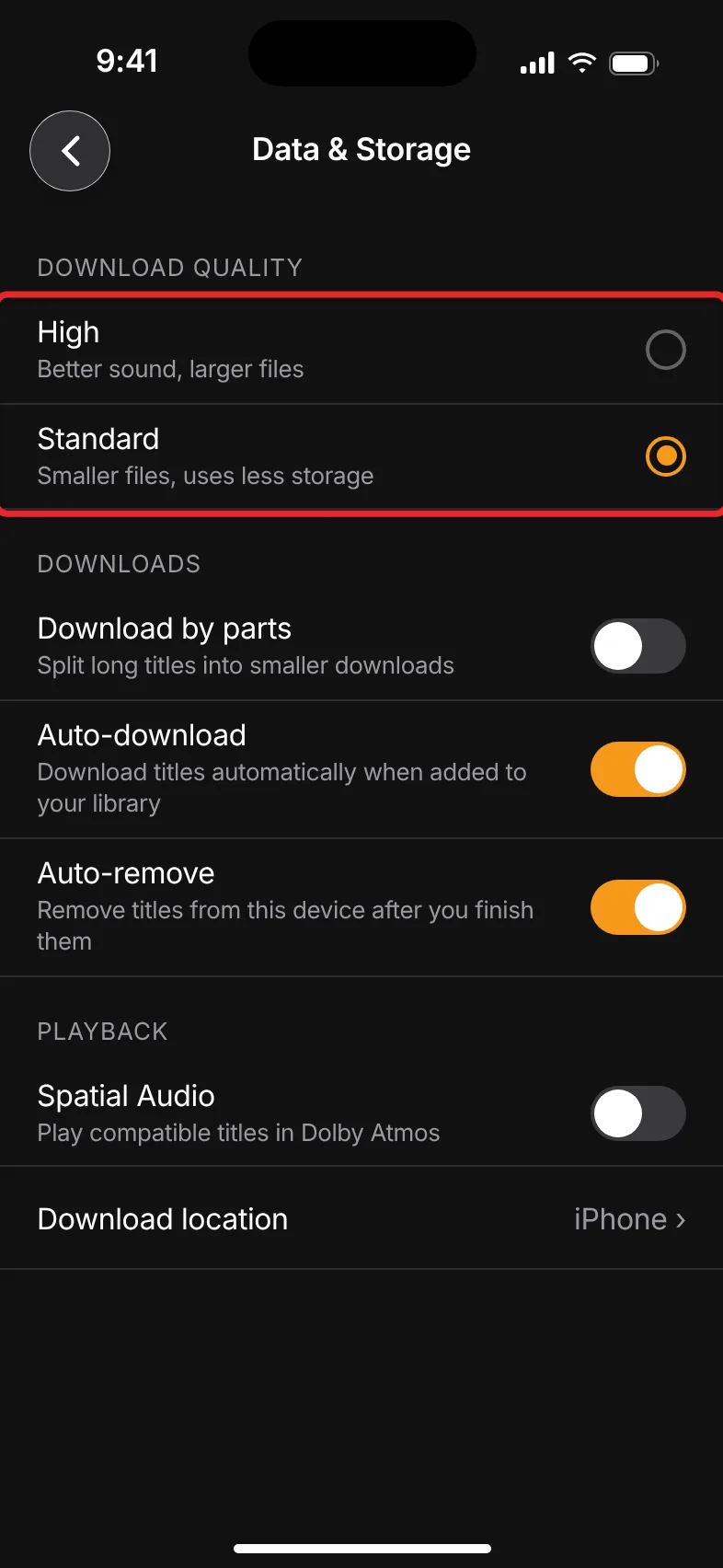
The change doesn’t shrink books that are already on your phone. To convert one, remove its download and download it again.
The same Data & Storage screen has three other settings that affect how much space Audible takes up:
- Auto-download downloads every new purchase right away. Turn it off if you’d rather choose which books go on your phone.
- Auto-remove deletes a downloaded book from your iPhone after you finish listening to it. The book stays in your library.
- Spatial Audio controls Dolby Atmos playback. Turning it off avoids the larger Dolby Atmos downloads on titles that offer them.
Standard or High: Which Should You Pick?
For most people, Standard is the better choice. Audiobooks are mostly a single voice, and spoken word holds up well at lower bitrates, especially through iPhone speakers, a car stereo, or basic earbuds. High quality is worth the extra space if you listen with good headphones, prefer full-cast productions with music and sound effects, or have plenty of free storage. If a book sounds flat in Standard, you can always remove it and download it again in High.
Freeing Up Space Used by Audible
The quickest way to get space back is to remove downloads of books you’ve finished. Removing a download deletes the file from your iPhone but keeps the book in your Audible library, along with your listening position. You can remove books from your iPhone in the Audible app one at a time or several at once, or delete a book from your account for good.
Avoid using Offload App on the iPhone Storage screen for this. Offloading keeps an app’s documents and data, so your downloaded books stay on the phone and the space doesn’t come back.
Streaming Instead of Downloading
You don’t have to download a book at all. Tap play on a book that isn’t downloaded and the app streams it, which uses mobile data or Wi-Fi instead of storage. Streaming an hour of audio uses about as much data as downloading that hour, so the table above also works as a rough guide to data use.
By default, Audible’s Stream to download setting saves the file in the background as you listen, so a streamed book can still end up on your phone. If you want books to download only on Wi-Fi, choose Stream & download on Wi-Fi only under Profile > Settings > Data & Storage.
Downloading is still the better choice before a flight, a long drive through areas with weak signal, or anywhere you want to avoid using cellular data.
If someone in your Amazon Family wants to read one of your ebooks, you can share a Kindle book through Family Library instead of buying a second copy.
Before a long drive, it also helps to set how far Audible’s skip buttons jump, so one tap backs up as far as you need.
If Audible Is Using More Space Than Expected
- Documents & Data is much larger than your books should be. Open the Audible app, tap Library, and tap the Downloaded filter. You may have more downloaded books than you realized, especially if Auto-download is on.
- A book is much bigger than the table suggests. Check for a Dolby Atmos badge and whether your download quality is set to High. Either can double the size or more.
- The number didn’t go down after you removed books. Close the Settings app and open it again, or wait a few minutes. iPhone Storage doesn’t always update right away.
- A download fails or stops partway. Audible’s download error guide suggests removing the download, switching to Standard quality, checking your Wi-Fi, and updating the app. Make sure your iPhone has free space at least equal to the book’s estimated size, plus some extra.
Frequently Asked Questions
How many Audible books can I fit on my iPhone?
Many novels run 10 to 15 hours. At Standard quality, a book that long takes about 150 to 220 MB, so each 1 GB of free space holds roughly 4 to 7 books. A phone with 20 GB to spare could hold about 90 books in Standard, or half that or fewer in High quality.
Is a 30-hour audiobook too big for my phone?
Usually not. In Standard quality a 30-hour book is about 450 MB, and in High quality it’s about 900 MB to 1.8 GB. Check your free space under Settings > General > iPhone Storage before you download it.
Does the download quality setting change books I already downloaded?
No. The setting applies only to new downloads. To switch an existing book to the other quality, remove its download and download it again.
Does Audible use storage if I only stream?
It can. With the default Stream to download setting, a book you stream is also saved to your phone, so it takes up space like any other download. Turn on Auto-remove or remove finished books to keep that in check. The app itself is small. Most of Audible’s storage use comes from downloaded books, which appear under Documents & Data.
Will removing a download delete the book from my Audible account?
No. Removing a download only deletes the file from your iPhone. The book stays in your library, and you can download it again whenever you want.

Matthew Burleigh is the founder, head writer, and editor of Solve Your Tech, which he launched in 2012. He has written technology tutorials since 2008 and worked in IT since 2003, including small-business support, IT management, and consulting. He holds Bachelor’s and Master’s degrees in Computer Science from Arizona State University.
Matthew writes practical guides for Windows, iPhone and iPad, Microsoft Office, Outlook, Google apps, and Android. Solve Your Tech’s guides are checked step by step against the device or app maker’s own documentation and tested on his own devices whenever he has the hardware or software, with clear steps, sources, and update dates.
Read more about Matthew and how Solve Your Tech writes and updates its guides, or report a correction.