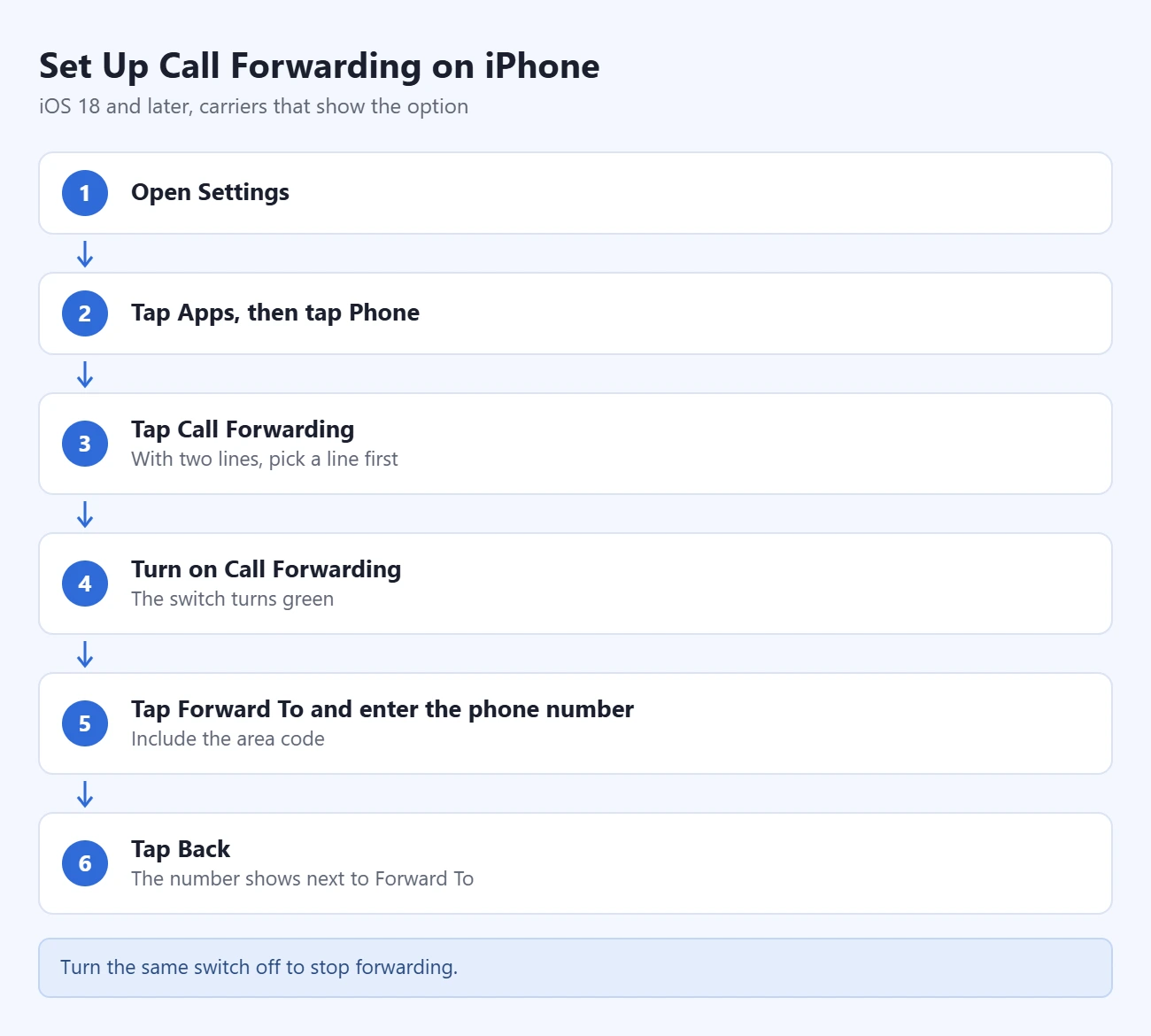
To set up call forwarding on an iPhone, open Settings, tap Apps, tap Phone, tap Call Forwarding, turn on the switch, then tap Forward To and enter the number that should receive your calls. Every incoming call then goes to that number until you turn the switch off. That switch only appears with carriers that let the iPhone control forwarding. Verizon, for example, uses dial codes instead.
The Settings steps below follow Apple’s iPhone User Guide page Set up call forwarding on iPhone, which Apple describes as a feature for GSM networks. The carrier methods come from each carrier’s own support pages, linked in their sections.
What You Need
- An iPhone with active cellular service. Call forwarding is a carrier feature. Your iPhone only sends the request. Set it up while you have cellular signal, not just Wi-Fi.
- iOS 18 or later for the exact path below. That includes iOS 26 and iOS 27. On iOS 17 and earlier, the Phone settings sit directly in Settings, with no Apps step.
- A working phone number to forward to. Verizon requires an active US number with all 10 digits, including the area code. T-Mobile accepts 10- or 11-digit numbers. Neither carrier lets you forward to an international number.
- A plan that includes forwarding. Verizon says most plans have no monthly fee for it, but a forwarded call is billed the same way as a call you answer on your phone. Check your own plan before forwarding for a long period.
How to Set Up Call Forwarding in iPhone Settings
Use this method if your carrier shows the Call Forwarding option. AT&T lists these same steps for current iPhone models.
- Open Settings. It is the gray gear icon on your Home Screen.
- Tap Apps, then tap Phone. Apps is at the bottom of the main Settings list. Phone is in the alphabetical list, or you can type it in the search field at the top.
- Tap Call Forwarding. The screen may take a few seconds to load while your iPhone asks the carrier for the current setting. If you have two lines, you are asked to pick one first.
- Turn on Call Forwarding. The switch turns green and a Forward To row appears under it.
- Tap Forward To and enter the phone number. Type the full number, including the area code.
- Tap Back. The number you typed now shows next to Forward To. Forwarding is active.
From this point your iPhone does not ring for regular cellular calls. Callers are sent straight to the other number. Text messages are not forwarded. Only calls are.
How to Confirm Call Forwarding Is On
- Check the setting. Go back to Settings > Apps > Phone > Call Forwarding. The switch should be green and the correct number should show next to Forward To.
- Look for the status icon. Apple’s list of iPhone status icons includes a Call Forwarding icon, a phone handset with an arrow. The status bar on an iPhone with Face ID has little room, so swipe down from the top-right corner to open Control Center and see the full row of icons.
- Make a test call. Call your iPhone from another phone. The forwarding number should ring instead. This is the only check that proves the carrier accepted the setting.
How to Turn Off Call Forwarding
- Open Settings and tap Apps, then Phone.
- Tap Call Forwarding.
- Turn off the Call Forwarding switch.
Wait for the switch to stay gray, then place a test call to make sure your iPhone rings again. If you turned forwarding on with a carrier code, turn it off with that carrier’s code too. The codes are in the next two sections.
Verizon: Forward Calls With Star Codes
Verizon handles forwarding on its network, and it says you have to manage it from the mobile phone itself. The codes below come from Verizon’s Call Forwarding FAQs.
- Open the Phone app and go to the keypad.
- Dial *72 and the 10-digit number, then tap the call button. For example, *72 followed by the area code and number. This forwards all calls.
- Listen for the beeps. You hear a series of beeps, and the call ends on its own.
- Dial *73 to turn forwarding off. You hear the beeps again, and the call ends.

To forward only the calls you do not pick up, dial *71 and the 10-digit number instead of *72. Verizon calls this conditional call forwarding. Your iPhone still rings first, and the call moves to the other number when you do not answer. *73 turns this off as well.
Verizon notes that star codes may not work outside its coverage area. If you set forwarding up before you travel, it should keep working while you roam.
AT&T and T-Mobile
AT&T: AT&T’s device support page for turning call forwarding on or off on an iPhone uses the Settings method above: Settings > Apps > Phone > Call Forwarding. That page does not give dial codes, so contact AT&T if you need forwarding only when your line is busy or unanswered.
T-Mobile: Use the Settings switch if your iPhone shows it. T-Mobile also publishes short codes on its self-service short codes page. Dial them from the Phone keypad and tap the call button. Replace “number” with the 10-digit number, keeping the 1 in front of it.
| What it does | Turn on | Turn off |
|---|---|---|
| Forward all calls | **21*1number# | ##21# |
| Forward when you do not answer | **61*1number# | ##61# |
| Forward when your phone is off or out of range | **62*1number# | ##62# |
| Forward when your line is busy | **67*1number# | ##67# |
| Reset all forwarding to the default | ##004# |
These codes are T-Mobile’s. Do not assume they work the same way on another carrier. If your service comes from a smaller brand or a prepaid carrier, look up that company’s own instructions or call its support line.
Conditional Call Forwarding: Busy or No Answer
The switch in iPhone Settings is all or nothing. It forwards every call, from every caller, at all times. It cannot forward only certain contacts, and it cannot follow a schedule.
Forwarding only when you are busy, do not answer, or cannot be reached is called conditional call forwarding. It is set up on the carrier’s side:
- Verizon: dial
*71plus the 10-digit number. Turn it off with*73. - T-Mobile: use the no-answer, not-reachable or busy codes in the table above.
- Other carriers: ask the carrier whether it offers conditional forwarding on your plan and how to turn it on.
Keep in mind that your voicemail normally picks up unanswered calls. If you add conditional forwarding and later want voicemail back, turn the conditional forwarding off or ask your carrier to reset it.
Call Forwarding With Dual SIM
If your iPhone has two lines, forwarding is set separately for each one. When you tap Call Forwarding, choose the line first, then turn on the switch and enter the number for that line.
Apple suggests one specific use for this in its Dual SIM guide. While you are on a call on one line, a call to the other line can go to voicemail. To avoid missing it, forward all calls from one of your numbers to the other. Apple recommends checking with your carrier for availability and any extra fees first.
Call Forwarding vs. Calls on Other Devices and Wi-Fi Calling
These three settings sound alike but do different jobs.
| Feature | What it does | Where to find it |
|---|---|---|
| Call Forwarding | Sends your calls to a different phone number. Your iPhone does not ring. | Settings > Apps > Phone > Call Forwarding |
| Calls on Other Devices | Lets your own Mac or iPad ring along with your iPhone. The devices must use the same Apple Account and be on the same Wi-Fi network. | Settings > Apps > Phone > Calls on Other Devices |
| Wi-Fi Calling | Carries your calls over Wi-Fi when cellular signal is weak. Your number does not change. | Settings > Cellular > Wi-Fi Calling |
If you only want to answer calls on your iPad or Mac, you do not need call forwarding. Turn on Allow Calls on Other Devices instead. Our guide to syncing an iPad and iPhone covers that setting along with messages and contacts. Apple’s steps for adding other devices to Wi-Fi Calling are on its Wi-Fi Calling support page.
If Call Forwarding Is Missing or Stuck Loading
Work through these checks in order.
- Check that you are on the right screen. On iOS 18 and later it is Settings > Apps > Phone. On iOS 17 and earlier it is Settings > Phone.
- Check your cellular signal. Turn off Airplane Mode and make sure you see signal bars. The Call Forwarding screen has to reach your carrier before it can show the switch.
- Restart your iPhone. Then open the Call Forwarding screen again and give it up to a minute.
- Update your carrier settings and iOS. Go to Settings > General > About and accept a carrier settings update if one is offered. Then check Settings > General > Software Update.
- Use your carrier’s method or contact your carrier. If the option is still missing, your carrier does not offer it through iPhone Settings. Verizon customers use the star codes above. Everyone else should ask the carrier whether forwarding is included in the plan.

Two more cases come up often:
- The switch turns itself back off. The carrier rejected the request. Check that the number is complete, is not an international number, and is not your own number. Then ask your carrier whether forwarding is blocked on your line.
- Calls are going somewhere unexpected. Forwarding may have been left on. Turn it off using the steps above, then test. If callers reach your voicemail without your phone ringing, see why an iPhone goes straight to voicemail for the other settings that cause it.
Frequently Asked Questions
Why is there no Call Forwarding option on my iPhone?
The option only appears when your carrier lets the iPhone manage forwarding. Apple describes it as a feature for GSM networks. Some carriers, including Verizon, use their own dial codes instead. On iOS 18 and later, also make sure you are looking in Settings > Apps > Phone.
Does my iPhone still ring when call forwarding is on?
No. When you forward all calls, your iPhone does not ring and callers go directly to the other number. With conditional forwarding from your carrier, your iPhone rings first and the call moves only if you are busy or do not answer.
Are text messages forwarded too?
No. Call forwarding moves voice calls only. Texts still arrive on your iPhone. To pass a text along to someone, see how to forward a text message on an iPhone.
Can I forward calls to an international number?
Usually not on the major US carriers. Verizon and T-Mobile both state that calls cannot be forwarded to international numbers. Ask your carrier if you are on a different network.
Does call forwarding cost extra?
It depends on your plan. Verizon says there is no monthly fee on most plans, though older plans may have one, and forwarded calls are billed like calls you answer. Check with your carrier before leaving forwarding on for weeks.
Can I forward calls from only one person?
No. The iPhone setting forwards every call. To stop calls from one person without forwarding anything, you can silence calls on your iPhone or block that number.
How do I turn off call forwarding if I no longer have the iPhone?
Contact your carrier. Verizon, for example, says to call customer service to turn forwarding on or off when you do not have the device with you.
Next Step
Turn forwarding on, call your iPhone from another phone, and confirm the right number rings. Before you rely on it, add a reminder to switch it off when you are back, so your calls return to your iPhone.

Matthew Burleigh is the founder, head writer, and editor of Solve Your Tech, which he launched in 2012. He has written technology tutorials since 2008 and worked in IT since 2003, including small-business support, IT management, and consulting. He holds Bachelor’s and Master’s degrees in Computer Science from Arizona State University.
Matthew writes practical guides for Windows, iPhone and iPad, Microsoft Office, Outlook, Google apps, and Android. Solve Your Tech’s guides are tested on current devices or checked against official product documentation, with clear steps, sources, and update dates.
Read more about Matthew and how Solve Your Tech writes and updates its guides, or report a correction.