Skip to content
Solve Your Tech
  • Windows
    • Settings, Desktop & Accounts
    • Files, Devices & Troubleshooting
  • iPhone & iPad
    • iPhone Settings & Basics
    • iPhone Messages, Photos & Apps
    • iPad
    • Apple Watch & AirPods
  • Android
  • Microsoft Office
    • Excel
    • Word
    • Outlook
    • PowerPoint
  • Google
    • Chrome
    • Docs
    • Sheets
    • Slides
    • Gmail
    • Google Drive
  • Home Tech
    • Fire TV
    • Roku & Apple TV
    • Printers & Ink
    • Wi-Fi & Smart Home
  • More
    • Firefox
    • Microsoft Edge
    • Photoshop
    • Social & Other Apps
    • Mac
    • Reviews & Buying Advice
    • Store
WindowsiPhoneAndroidExcelWordOutlookGoogleChrome

Mobile Devices

How-to guides for iPhone, iPad, Apple Watch, and Android phones and tablets.

Steps to check why iPhone volume is low: identify what is quiet, adjust the volume while that sound plays, check the playback destination, compare it with another sound

Why Your iPhone Volume Is Suddenly Too Low and How to Fix It

November 10, 2026March 20, 2024 by Matthew Burleigh

Diagnose sudden low iPhone volume by checking media, calls, alerts, headphones, playback routing, and Attention Aware behavior. Know when speaker service is needed.
Categories Mobile Devices
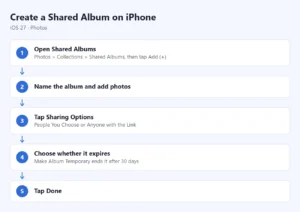
Steps to create a Shared Album on iPhone: open Shared Albums, name the album and add photos, tap Sharing Options, choose whether it expires, tap Done

How to Share Albums With Friends and Family on iPhone

November 10, 2026March 19, 2024 by Matthew Burleigh

Create and share an album on iPhone, invite friends, set permissions, and check storage limits. Includes separate iOS 27 and older-album instructions.

Categories Mobile Devices
How iPhones are made: designed by Apple in California, parts from global suppliers, assembled mostly in China with about a quarter in India

Where Are iPhones Made? China, India, and Beyond

November 15, 2026March 19, 2024 by Matthew Burleigh

iPhones are designed by Apple in California and put together mostly in China, with a large and growing share built in India. Apple does not …

Read More

Categories Mobile Devices
Files by Google Trash selection detail with two files selected and Delete highlighted at the bottom

How to Empty the Trash on Android

November 15, 2026March 19, 2024 by Matthew Burleigh

To empty the photo trash on Android, open Google Photos and tap Collections > Trash > More > Empty Trash > Delete permanently. For other …

Read More

Categories Mobile Devices
Step path to unblock a contact on iPhone: Settings, Privacy and Security, Blocked Contacts, Edit, Unblock

How to Unblock a Contact on iPhone

November 10, 2026March 18, 2024 by Matthew Burleigh

To unblock a contact on an iPhone, open Settings > Privacy & Security > Blocked Contacts, tap Edit, tap the red delete button next to …

Read More

Categories Mobile Devices
Steps to clear Safari search and browsing history on an iPhone

How to Clear Search History on iPhone

November 10, 2026March 18, 2024 by Matthew Burleigh

To clear your Safari search and browsing history on an iPhone, open Settings, tap Apps, tap Safari, then tap Clear History and Website Data. Choose …

Read More

Categories Mobile Devices
Face ID and Passcode settings detail with Attention Aware Features shown on and highlighted

How to Change Lock Screen Timeout Settings on iPhone

November 10, 2026March 18, 2024 by Matthew Burleigh

To change how long your iPhone waits before the screen locks, open Settings > Display & Brightness > Auto-Lock and tap a time. You can …

Read More

Categories Mobile Devices
Comparison card showing the difference between mirroring an Android screen and casting from an app to a TV

How to Screen Mirror Android to a TV

November 10, 2026March 18, 2024 by Matthew Burleigh

This post contains affiliate links. As an Amazon Associate, solveyourtech.com earns from qualifying purchases, at no extra cost to you. To screen mirror an Android …

Read More

Categories Mobile Devices
Selected text on Android with the Copy option highlighted in the menu

Where Is the Clipboard on Android? How to Find and Use It

November 10, 2026March 18, 2024 by Matthew Burleigh

The clipboard on Android lives in your keyboard. Tap any text box so the keyboard opens, then tap the Clipboard icon (it looks like a …

Read More

Categories Mobile Devices
Comparison of Silent mode and Do Not Disturb on iPhone showing what each one silences and how to turn it on

How to Silence or Unsilence Calls on iPhone

November 10, 2026March 18, 2024 by Matthew Burleigh

To silence calls on an iPhone, turn on Silent mode. To unsilence them, turn Silent mode off. On an iPhone with a Ring/Silent switch, flip …

Read More

Categories Mobile Devices
Steps to open an empty GarageBand project: create a new audio recording, tap Tracks, open the Loop Browser

How to Set a Ringtone on iPhone From Files

October 20, 2026March 13, 2024 by Matthew Burleigh

Learn how to set a custom ringtone on your iPhone using files from your device with our easy step-by-step guide.

Categories Mobile Devices, Tutorials
Two panels showing a selected sample photo and the AirDrop option in Photos, then the example recipient Travel iPad, with both controls outlined in red

How to Transfer Photos from iPhone to iPad

November 12, 2026March 13, 2024 by Matthew Burleigh

Learn how to easily transfer your iPhone photos to your iPad with our step-by-step guide. Keep your memories safe and accessible on both devices.

Categories Mobile Devices, Tutorials
Steps to open Notification Center on iPhone

Where Is Notification Center on iPhone?

November 18, 2026March 13, 2024 by Matthew Burleigh

Struggling to find the Notification Center on your iPhone? Follow our step-by-step guide to easily access all your alerts and updates.

Categories Mobile Devices, Tutorials
Steps to read Google Play ebooks on iPhone: open Google Play Books, tap Library, adjust the reading view

Can You Get Google Play on iPhone? Books, Movies, and App Limits

November 10, 2026March 13, 2024 by Matthew Burleigh

Use Google Play Books and Google TV on iPhone, find eligible purchases, and check Play credit. Learn why the Android Play Store cannot be installed.

Categories Mobile Devices, Tutorials
Steps to check what kind of message you sent: open the conversation, look at the bubble color and the text under it, blue: look for Delivered or Read, green: check the message type, red exclamation point: Not Delivered

What Does Delivered Mean on iPhone?

October 20, 2026March 12, 2024 by Matthew Burleigh

Delivered under an iPhone message means the messaging service confirmed that your message reached the recipient’s account. It does not mean the person opened it, …

Read More

Categories Mobile Devices
iOS 27 Wi-Fi settings with Wi-Fi on, a masked connected network marked by a blue check, and Connectivity Assist off

How to Fix Wi-Fi Not Working on iPhone When Other Devices Work

November 12, 2026March 12, 2024 by Matthew Burleigh

If Wi-Fi works on your other devices but not your iPhone, the problem is almost always a setting on the iPhone or a router rule …

Read More

Categories Mobile Devices
Steps to add a website shortcut in Chrome on Android: open the site, tap More, Install and create shortcut, Create shortcut, rename, Add

How to Add a Chrome Shortcut to Your Android Home Screen

November 9, 2026March 12, 2024 by Matthew Burleigh

To add a website shortcut to your Android Home screen, open the site in Chrome, tap More (the three dots next to the address bar), …

Read More

Categories Mobile Devices
Illustration of moving an app on the Android home screen: touch and hold, drag, hold at the screen edge to change pages, then let go

How to Move Apps on Android

November 10, 2026March 12, 2024 by Matthew Burleigh

To move an app on your Android Home screen, touch and hold its icon, then drag it to a new spot and lift your finger. …

Read More

Categories Mobile Devices
Illustration of Android phone side buttons: Volume down plus Side on Samsung Galaxy, Power plus Volume up on Pixel 6 and later

How to Turn Off an Android Phone

November 10, 2026March 11, 2024 by Matthew Burleigh

To turn off most Android phones, open the power menu and tap Power off. On a Samsung Galaxy, press and hold the Side button and …

Read More

Categories Mobile Devices
Steps to check an app's notification sound: open Settings and tap Notifications, tap the app's name, find Sounds, look for a link to the app's own settings

How to Change an iPhone App’s Notification Sound

October 20, 2026March 11, 2024 by Matthew Burleigh

Most third-party iPhone apps don’t let you pick a custom notification sound in Settings. To check, open Settings > Notifications, tap the app, and look …

Read More

Categories Mobile Devices
Illustration comparing QR code scanning settings on Pixel and Samsung Galaxy phones

How to Scan a QR Code on Android

November 12, 2026March 8, 2024 by Matthew Burleigh

To scan a QR code on Android, open the Camera app and point it at the code so the whole square is on the screen. …

Read More

Categories Mobile Devices
Steps to close tabs in Chrome on Android: open Chrome, tap Switch tabs, tap the X on one tab, choose Close all tabs

How to Close Tabs on Android

October 20, 2026March 7, 2024 by Matthew Burleigh

To close a tab on an Android phone in Chrome, tap Switch tabs (the square with a number beside the address bar), then tap the …

Read More

Categories Mobile Devices
Card showing the path to find a file on iPhone: open Files, tap Browse, choose a location, open a folder, or use search

How to Find Your Files on iPhone or iPad

November 10, 2026March 6, 2024 by Matthew Burleigh

To find a file on your iPhone, open the Files app, tap Browse, and choose the location where the file was saved: iCloud Drive, On …

Read More

Categories Mobile Devices
Comparison of deleting voicemail in the Android Phone app and by calling the carrier mailbox

How to Clear Voicemail on Android

November 10, 2026March 5, 2024 by Matthew Burleigh

To clear voicemail on Android, open the Phone app, tap Voicemail, touch and hold a message, tap any others you want to remove, and tap …

Read More

Categories Mobile Devices
Illustration of steps to install an APK file on Android

How to Install an APK on Android

November 12, 2026March 5, 2024 by Matthew Burleigh

To install an APK on Android, download the file, open it from your notifications or the Files app, and tap Install. The first time, Android …

Read More

Categories Mobile Devices
Steps to check call volume and audio output: press Volume Up during a call, tap Audio on the call screen, check Call Audio Routing

iPhone Can’t Hear Caller Unless on Speaker: How to Fix It

November 10, 2026March 4, 2024 by Matthew Burleigh

If you can hear callers on speakerphone but not with the iPhone at your ear, check where the call audio is going and whether the …

Read More

Categories Mobile Devices
Steps to find your Apple ID on an iPhone: open Settings, tap your name, tap Sign-In & Security, read the email addresses and phone numbers

How to Find Your Apple ID on iPhone

November 7, 2026February 29, 2024 by Matthew Burleigh

Your Apple Account email appears under your name at the top of the account screen in Settings. Open Settings and tap your name to see …

Read More

Categories Mobile Devices
Steps to set up a Fitbit on an iPhone: charge the Fitbit and turn on Bluetooth, sign in with a Google Account, add the device, check the last-synced time

How to Sync a Fitbit with an iPhone Using Google Health

November 10, 2026February 29, 2024 by Matthew Burleigh

To sync a Fitbit with an iPhone, keep the tracker near the phone, turn on Bluetooth, and open the Google Health app. Then pull down …

Read More

Categories Mobile Devices
iPhone call statuses: Canceled Call means you hung up before an answer, Outgoing Call connected, Missed Call was not answered

What Does Canceled Call Mean on iPhone?

November 5, 2026February 28, 2024 by Matthew Burleigh

Canceled Call on an iPhone means a call you placed ended before it connected. In most cases you hung up before the other person answered. …

Read More

Categories Mobile Devices
Google Phone keypad detail with the 1 key and its voicemail tape icon highlighted

How to Set Up Voicemail on Android

November 10, 2026February 28, 2024 by Matthew Burleigh

To set up voicemail on most Android phones, open the Phone app, go to the keypad, and touch and hold 1. This calls your carrier’s …

Read More

Categories Mobile Devices
Older posts
Newer posts
← Previous Page1 … Page7 Page8 Page9 … Page27 Next →

Join Our Free Newsletter

Featured guides and deals

You may opt out at any time.
Read our Privacy Policy

  • iPhone
  • iPad
  • Apple Watch & AirPods
  • Google Docs
  • Google Sheets
  • Google Slides
  • Google Chrome
  • Microsoft Excel
  • Microsoft Outlook
  • Microsoft Powerpoint
  • Microsoft Windows
  • Microsoft Word
  • Firefox
  • Photoshop
  • Android
  • Home Tech
  • Google
  • Microsoft Edge

info@solveyourtech.com
4845290651
2138 W. Union Blvd.
#1037
Bethlehem, PA 18018
United States

  • SolveYourTech YouTube
  • SolveYourTech Facebook
  • SolveYourTech Instagram
  • SolveYourTech Twitter
  • SolveYourTech Pinterest
  • SolveYourTech LinkedIn
  • SolveYourTech TikTok
  • Newsletter
  • Affiliate Disclaimer
  • Terms of Use
  • Privacy Policy
  • Contact
  • About Us
© SolveYourTech.com 2026We use Microsoft Clarity and Google Analytics to see how visitors use this site. See our Privacy Policy for details.
  • Windows
    • Settings, Desktop & Accounts
    • Files, Devices & Troubleshooting
  • iPhone & iPad
    • iPhone Settings & Basics
    • iPhone Messages, Photos & Apps
    • iPad
    • Apple Watch & AirPods
  • Android
  • Microsoft Office
    • Excel
    • Word
    • Outlook
    • PowerPoint
  • Google
    • Chrome
    • Docs
    • Sheets
    • Slides
    • Gmail
    • Google Drive
  • Home Tech
    • Fire TV
    • Roku & Apple TV
    • Printers & Ink
    • Wi-Fi & Smart Home
  • More
    • Firefox
    • Microsoft Edge
    • Photoshop
    • Social & Other Apps
    • Mac
    • Reviews & Buying Advice
    • Store