Skip to content
Solve Your Tech
  • Windows
    • Settings, Desktop & Accounts
    • Files, Devices & Troubleshooting
  • iPhone & iPad
    • iPhone Settings & Basics
    • iPhone Messages, Photos & Apps
    • iPad
    • Apple Watch & AirPods
  • Android
  • Microsoft Office
    • Excel
    • Word
    • Outlook
    • PowerPoint
  • Google
    • Chrome
    • Docs
    • Sheets
    • Slides
    • Gmail
    • Google Drive
  • Home Tech
    • Fire TV
    • Roku & Apple TV
    • Printers & Ink
    • Wi-Fi & Smart Home
  • More
    • Firefox
    • Microsoft Edge
    • Photoshop
    • Social & Other Apps
    • Mac
    • Reviews & Buying Advice
    • Store
WindowsiPhoneAndroidExcelWordOutlookGoogleChrome

Apps & Software

How-to guides for Microsoft Excel, Word, Outlook, PowerPoint, Windows, Photoshop, and other apps and software.

Steps to set a reminder on Windows 11: add a task, open the task, choose Remind me, and pick a date and time

How to Set Reminders on Windows 11

October 20, 2026December 9, 2024 by Matthew Burleigh

To set a reminder on Windows 11, open Microsoft To Do, add a task, select it, and choose Remind me > Pick a date & …

Read More

Categories Apps & Software
Steps to pin apps to the Windows 11 taskbar: open an app you use often, pin it, arrange the buttons, remove unused pins

How to Customize the Windows 11 Taskbar

October 20, 2026December 6, 2024 by Matthew Burleigh

To customize the Windows 11 taskbar, right-click an empty spot on it and click Taskbar settings, or go to Start > Settings > Personalization > …

Read More

Categories Apps & Software
Illustration of the order to try Snipping Tool fixes in Windows 11: restart, update, repair then reset, check settings

How to Fix Snipping Tool in Windows 11

October 24, 2026December 5, 2024 by Matthew Burleigh

If Snipping Tool is not working in Windows 11, start with the simple fixes before reinstalling anything: close and reopen the app, restart the PC, …

Read More

Categories Apps & Software
Illustration of keyboard shortcuts to show the desktop in Windows 11

How to Get Back to the Normal Desktop in Windows 11

October 24, 2026December 4, 2024 by Matthew Burleigh

To get back to the desktop in Windows 11, press Windows key + D. All open windows minimize and the desktop appears; press it again …

Read More

Categories Apps & Software
Windows 11 Settings, Bluetooth and devices, Printers and scanners page with the Add device button and a list of installed printers and scanners

How to Scan on Windows 11

October 23, 2026December 4, 2024 by Matthew Burleigh

To scan on Windows 11, make sure your scanner shows up in Settings > Bluetooth & devices > Printers & scanners, then open the free …

Read More

Categories Apps & Software
Comparison card showing the menu path to install YouTube as an app in Chrome and in Microsoft Edge on Windows 11

How to Download the YouTube App on Windows 11

October 24, 2026December 2, 2024 by Matthew Burleigh

Install YouTube as a browser app on Windows 11 using Chrome or Edge. Check the current menu paths and separate app installation from offline downloads.

Categories Apps & Software
File Explorer showing This PC selected in the left pane and the OS (C:) drive under Devices and drives in Windows 11

How to Find the C or D Drive in Windows 11

October 23, 2026November 25, 2024 by Matthew Burleigh

To find the C drive in Windows 11, press Windows key + E to open File Explorer, then select This PC in the left pane. …

Read More

Categories Apps & Software
Steps to get a missing taskbar back in Windows 11

How to Get the Taskbar Back in Windows 11

October 24, 2026November 25, 2024 by Matthew Burleigh

If the Windows 11 taskbar disappeared, first move your mouse to the screen edge where the taskbar sits (usually the bottom). If it slides up, …

Read More

Categories Apps & Software
Illustration of the steps to set Windows 11 sleep to Never in Power and battery settings

How to Stop Your Computer From Turning Off by Itself in Windows 11

October 24, 2026November 22, 2024 by Matthew Burleigh

If your Windows 11 PC goes dark after a few minutes, it’s usually going to sleep. Open Settings > System > Power & battery, expand …

Read More

Categories Apps & Software
Steps to turn on print history logging in Windows 11 Event Viewer

How to Check Print History in Windows 11

October 24, 2026November 21, 2024 by Matthew Burleigh

Windows 11 doesn’t keep a print history by default. The print queue only shows jobs that are waiting or printing now. To keep a record …

Read More

Categories Apps & Software
Steps to check your PowerShell version: run $PSVersionTable, read PSVersion and PSEdition, record the starting version

How to Update PowerShell on Windows 11

October 20, 2026November 20, 2024 by Matthew Burleigh

To update PowerShell 7 on Windows 11, open Terminal or Command Prompt and run winget upgrade –id Microsoft.PowerShell –exact, then open a new PowerShell 7 …

Read More

Categories Apps & Software
Steps to check error logs in Event Viewer on Windows 11

How to Check Error Logs on Windows 11

October 20, 2026November 14, 2024 by Matthew Burleigh

To check error logs on Windows 11, right-click the Start button, select Event Viewer, and open Windows Logs > System or Windows Logs > Application. …

Read More

Categories Apps & Software
Steps to run a troubleshooter in Windows 11: Settings, System, Troubleshoot, Other troubleshooters, then Run and follow the Get Help prompts

How to Run a Troubleshooter in Windows 11

October 23, 2026November 13, 2024 by Matthew Burleigh

To run a troubleshooter in Windows 11, open Settings > System > Troubleshoot > Other troubleshooters, then select Run next to the area that’s giving …

Read More

Categories Apps & Software
Steps to update a printer driver in Windows 11: open Windows Update advanced options, check Optional updates, install the printer driver, or download it from the printer maker

How to Update a Printer Driver in Windows 11

October 24, 2026November 7, 2024 by Matthew Burleigh

To update a printer driver in Windows 11, open Settings > Windows Update > Advanced options > Optional updates, expand Driver updates, and install the …

Read More

Categories Apps & Software
Four-step path to close all Safari tabs on an iPad: open Safari, tap Tabs, hold Done, tap Close All Tabs

How to Close All Open Tabs on iPad in Safari

October 25, 2026November 6, 2024 by Matthew Burleigh

To close all open Safari tabs on your iPad, tap the Tabs button, touch and hold Done, then tap Close All [number] Tabs. This closes …
Read More

Categories Apps & Software
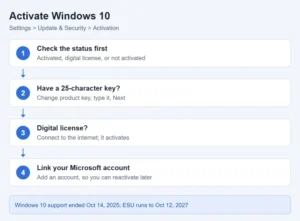
Card showing how to check activation status and activate Windows 10 with a product key or digital license

How to Activate Windows 10

October 24, 2026November 6, 2024 by Matthew Burleigh

To activate Windows 10, open Start > Settings > Update & Security > Activation. If you have a 25-character product key, select Change product key, …

Read More

Categories Apps & Software
Steps to print on Windows 11: open what you want to print, press Ctrl + P, select your printer, check the preview and settings, select Print

How to Print on Windows 11

October 20, 2026November 1, 2024 by Matthew Burleigh

To print on Windows 11, open the document, photo or webpage, press Ctrl + P, select your physical printer, check the preview and settings, and …

Read More

Categories Apps & Software
Illustration of the four Windows 11 taskbar search options

How to Move the Search Bar in Windows 11

October 20, 2026October 30, 2024 by Matthew Burleigh

You can’t drag the Windows 11 search bar to a new spot by itself. It always sits next to the Start button, but you can …

Read More

Categories Apps & Software
Taskbar position options Bottom, Top, Left, and Right in Windows 11 taskbar settings

How to Change Taskbar Location in Windows 11

October 23, 2026October 25, 2024 by Matthew Burleigh

To move the taskbar in Windows 11, open Settings > Personalization > Taskbar, expand Taskbar behaviors, and pick Bottom, Top, Left, or Right under Taskbar …
Read More

Categories Apps & Software
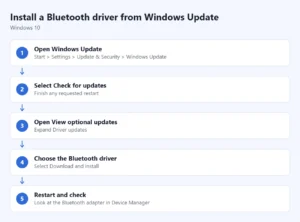
Steps to install a Bluetooth driver from Windows Update: open Windows Update, select Check for updates, open View optional updates, choose the Bluetooth driver, restart and check

How to Install a Bluetooth Driver in Windows 10

October 20, 2026October 18, 2024 by Matthew Burleigh

To install a Bluetooth driver in Windows 10, check Settings > Update & Security > Windows Update, including View optional updates when it appears. If …

Read More

Categories Apps & Software
Illustration of the steps to open Registry Editor in Windows 11 and back up a key

How to Open Registry Editor in Windows 11

October 24, 2026October 17, 2024 by Matthew Burleigh

To open Registry Editor in Windows 11, press Windows key + R, type regedit, press Enter, and select Yes when Windows asks for permission. You …

Read More

Categories Apps & Software
Three ways to find the Downloads folder in Windows 11

How to Find Downloads on Windows 11

October 24, 2026October 17, 2024 by Matthew Burleigh

To find your downloads on Windows 11, press Windows key + E to open File Explorer and select Downloads in the left pane. Files you …

Read More

Categories Apps & Software
Comparison card showing that a Windows 11 username can be looked up in Settings or with whoami, while a sign-in password can only be reset

How to Find Your Computer Username and Password in Windows 11

October 24, 2026October 17, 2024 by Matthew Burleigh

To find your username in Windows 11, open Settings > Accounts > Your info. Your account name is at the top, with your email address …

Read More

Categories Apps & Software
Steps to see what is taking up space in Windows 11 Storage settings

How to See What’s Taking Up Space on Your PC in Windows 11

October 24, 2026October 17, 2024 by Matthew Burleigh

To see what’s taking up space in Windows 11, open Settings > System > Storage. Windows shows how much space apps, temporary files, documents, pictures, …

Read More

Categories Apps & Software
Illustration of four ways to center or position a window in Windows 11

How to Center a Window in Windows 11

October 24, 2026October 17, 2024 by Matthew Burleigh

Windows 11 has no built-in “center window” command or keyboard shortcut. To center a window, drag it by its title bar to the middle of …

Read More

Categories Apps & Software
Clipboard history switch on the Clipboard page in Windows 11 Settings

How to View Clipboard History in Windows 11 and 10

October 23, 2026October 17, 2024 by Matthew Burleigh

To view clipboard history in Windows 11 or Windows 10, press Windows key + V. A panel opens with the items you copied most recently, …

Read More

Categories Apps & Software
Steps to install JioHotstar as an app in Microsoft Edge on Windows 11

How to Get JioHotstar (Hotstar) on a Windows 11 Laptop

October 24, 2026October 15, 2024 by Matthew Burleigh

Hotstar is now called JioHotstar, and there is no separate program to download for Windows 11: open hotstar.com in Microsoft Edge or Google Chrome, sign …

Read More

Categories Apps & Software
Diagram of the Windows 11 path to Network reset: Settings, Network and internet, Advanced network settings, Network reset, Reset now, Yes

How to Reset Network Settings in Windows 11

October 26, 2026October 15, 2024 by Matthew Burleigh

To reset network settings in Windows 11, go to Settings > Network & internet > Advanced network settings > Network reset, select Reset now, and …

Read More

Categories Apps & Software
Steps to reset Windows 11 from Settings: open Recovery, select Reset PC, choose the reinstall source, review the summary, confirm and wait

How to Reset All Settings in Windows 11

October 25, 2026October 14, 2024 by Matthew Burleigh

Choose a targeted settings reset, Windows repair, System Restore, or Reset PC in Windows 11. Learn what each keeps and prepare your backup first.

Categories Apps & Software
Steps to wipe and reinstall Windows 11 with Reset this PC

How to Wipe and Reinstall Windows 11

October 24, 2026October 14, 2024 by Matthew Burleigh

To wipe and reinstall Windows 11, open Settings > System > Recovery, select Reset PC, choose Remove everything, pick Cloud download or Local reinstall, and …

Read More

Categories Apps & Software
Older posts
Newer posts
← Previous Page1 … Page5 Page6 Page7 … Page22 Next →

Join Our Free Newsletter

Featured guides and deals

You may opt out at any time.
Read our Privacy Policy

  • iPhone
  • iPad
  • Apple Watch & AirPods
  • Google Docs
  • Google Sheets
  • Google Slides
  • Google Chrome
  • Microsoft Excel
  • Microsoft Outlook
  • Microsoft Powerpoint
  • Microsoft Windows
  • Microsoft Word
  • Firefox
  • Photoshop
  • Android
  • Home Tech
  • Google
  • Microsoft Edge

info@solveyourtech.com
4845290651
2138 W. Union Blvd.
#1037
Bethlehem, PA 18018
United States

  • SolveYourTech YouTube
  • SolveYourTech Facebook
  • SolveYourTech Instagram
  • SolveYourTech Twitter
  • SolveYourTech Pinterest
  • SolveYourTech LinkedIn
  • SolveYourTech TikTok
  • Newsletter
  • Affiliate Disclaimer
  • Terms of Use
  • Privacy Policy
  • Contact
  • About Us
© SolveYourTech.com 2026
  • Windows
    • Settings, Desktop & Accounts
    • Files, Devices & Troubleshooting
  • iPhone & iPad
    • iPhone Settings & Basics
    • iPhone Messages, Photos & Apps
    • iPad
    • Apple Watch & AirPods
  • Android
  • Microsoft Office
    • Excel
    • Word
    • Outlook
    • PowerPoint
  • Google
    • Chrome
    • Docs
    • Sheets
    • Slides
    • Gmail
    • Google Drive
  • Home Tech
    • Fire TV
    • Roku & Apple TV
    • Printers & Ink
    • Wi-Fi & Smart Home
  • More
    • Firefox
    • Microsoft Edge
    • Photoshop
    • Social & Other Apps
    • Mac
    • Reviews & Buying Advice
    • Store