This post contains affiliate links. As an Amazon Associate, solveyourtech.com earns from qualifying purchases, at no extra cost to you.
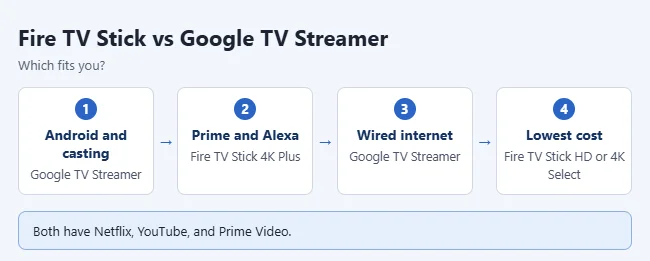
Pick the Google TV Streamer if you use Android or cast from your phone a lot. It has Google Cast built in, plus Ethernet and 32GB of storage. Pick a Fire TV Stick if you watch a lot of Prime Video, use Alexa, or want to spend less. The Fire TV Stick 4K Plus is the best all-around Fire stick.
The Chromecast this post used to compare was discontinued in 2024. Google replaced it with the Google TV Streamer. Specs come from the Google Store and Amazon’s Fire TV listings, checked in September 2026.
In this article:
- Fire TV Stick 4K Plus vs. Google TV Streamer
- Which Fire TV Stick is which?
- Setup and Size: Stick vs. Box
- Smart Home Features
- Who should get which
- How to choose a streaming device
- Frequently asked questions
Fire TV Stick 4K Plus vs. Google TV Streamer
| Fire TV Stick 4K Plus | Google TV Streamer | |
|---|---|---|
| Picture | 4K with Dolby Vision and HDR10+ | 4K with Dolby Vision, HDR10, HDR10+, HLG |
| Audio | Dolby Atmos | Dolby Atmos |
| Wi-Fi | Wi-Fi 6 | Wi-Fi 802.11ac |
| Ethernet | No built-in port | Yes |
| Storage | Half of the 4K Max’s 16GB | 32GB |
| Voice assistant | Alexa+ | |
| Casting from phones | No Google Cast | Google Cast built in |
| HDMI cable | Plugs straight into the TV | Sold separately |
Which Fire TV Stick is which?
- Fire TV Stick HD: for HD TVs. Amazon says it can be powered by the TV with the included USB-C cable.
- Fire TV Stick 4K Select: entry-level 4K with HDR10+.
- Fire TV Stick 4K Plus: adds Dolby Vision, Dolby Atmos, and Wi-Fi 6. The best pick for most people.
- Fire TV Stick 4K Max: faster, with Wi-Fi 6E and 16GB of storage.
Setup and Size: Stick vs. Box
A Fire TV Stick plugs straight into your TV’s HDMI port and hides behind the TV. The Google TV Streamer is a small box that sits next to the TV instead. According to the Google Store specs, it measures 6.4 by 3.0 by 1.0 inches and weighs 5.7 ounces.
- Power: The Streamer uses USB-C power with the included adapter and a 1.8-meter power cable.
- HDMI cable: Google says a certified HDMI 2.1 cable is required and sold separately, so budget for one.
- Wired internet: The Streamer has a gigabit Ethernet port (10/100/1000 Mbps), which helps if your Wi-Fi is weak where the TV sits.
- Remote: The Streamer comes with a voice remote and two AAA batteries.
Bottom line: If you want nothing visible, a stick is tidier. If you want a wired connection or plan to add smart home devices, the box is worth the extra space.

Smart Home Features
Google lists Matter support and a Thread border router in the Streamer’s specs. That means it can act as a hub for Matter and Thread smart home devices, such as some smart plugs, lights, and sensors, in the Google Home app. If your smart home already runs on Google Home, that’s a point in the Streamer’s favor.
Who should get which
- Android phone owners and heavy casters: Google TV Streamer. Add an HDMI 2.1 cable, since one isn’t included.
- Prime members and Alexa homes: Fire TV Stick 4K Plus.
- Wired internet: the Google TV Streamer has an Ethernet port built in.
- Lowest cost: a Fire TV Stick HD or 4K Select, or a Roku stick (see which Roku to buy).
How to choose a streaming device
- Check whether your TV is HD or 4K, and which HDR formats it supports.
- Think about your phone. Android users get the most from Google Cast. See how to screen mirror an Android phone to a TV.
- Decide which voice assistant you already use: Alexa or Google.
- Check how far the TV is from your router. Get Ethernet or better Wi-Fi if streams buffer.
- Make sure the apps you watch are available. The big ones are on all of these devices. Our chart of streaming service availability by device shows which services each platform supports.

Frequently asked questions
Can I cast from my phone to a Fire TV Stick?
Not with Google Cast. Some apps have their own ways to send video to Fire TV, but it isn’t the same as a Chromecast. If casting matters, get the Google TV Streamer.
Do both have Netflix, YouTube, and Prime Video?
Yes. The major apps are on both platforms.
What happened to the Chromecast?
Google stopped making it in 2024. See is Chromecast discontinued, and what to buy instead.
Related: how to edit Nest thermostat presets in the Google Home app.

Matthew Burleigh has been writing tech tutorials since 2008. His writing has appeared on dozens of different websites and been read hundreds of millions of times.
After receiving his Bachelor’s and Master’s degrees in Computer Science he spent several years working in IT management for small businesses. However, he now works full time writing content online and creating websites.
His main writing topics include iPhones, Microsoft Office, Google Apps, Android, and Photoshop, but he has also written about many other tech topics as well.