How to Start Page Numbers on Page 3 in Word: A Step-by-Step Guide
Starting page numbers on page 3 in Word is a handy trick for reports or essays with a title page and table of contents. Here’s …
How-to guides and tutorials to help you use Microsoft Office applications like Word, Excel, and Powerpoint.
Starting page numbers on page 3 in Word is a handy trick for reports or essays with a title page and table of contents. Here’s …
If your Outlook view looks like it went through a blender, don’t worry. Getting it back to its original state is easier than you might …
MLA formatting is crucial for students and professionals working with academic papers. You’ll need to set up your Word document with specific margins, font styles, …
Creating a link for a Word document is a simple task that lets you share your work with others easily. First, upload your document to …
Saving your PowerPoint presentation as a PDF with notes is a simple task that ensures your audience gets both your slides and your invaluable commentary. …
Saving an Excel file to your desktop is straightforward and ensures easy access to your important documents. Open your Excel file, click “File,” select “Save …
Fitting everything on one page in Word can seem like trying to fit a square peg in a round hole. The key is clever formatting …
To make the header smaller in Word, you’ll need to adjust its height. Begin by accessing the header section, then use the formatting options to …
Want to become a pro at using XLOOKUP in Excel to search across two sheets? It’s a powerful tool that can save you tons of …
Adding a Table of Contents in Microsoft Word is a straightforward process that can make navigating through a document a breeze. First, ensure you’ve used …
Creating your own template in Word is like crafting a custom-fit outfit for your documents. Start by opening a new document and designing it with …
Matching data in Excel from two worksheets can be a breeze if you know the right steps. You simply need to use Excel’s built-in functions …
Copying a sheet from one workbook to another in Excel is straightforward. First, open both the source workbook (where the sheet is) and the destination …
Want to boost your productivity in Excel without spending hours typing? Dictating in Excel allows you to speak your data entries aloud and have them …
If you need to mark something as completed, incorrect, canceled, or no longer relevant, strikethrough in Excel is the fastest way to do it. Instead …
Switching your Excel columns from numbers to letters is a simple process that helps you manage and navigate data. By changing this setting, you’ll make …
Adding a date picker in Excel can save you a ton of time, especially if you’re managing schedules or tracking deadlines. This handy feature lets …
Setting multiple tabs in Microsoft Word is a handy skill that lets you organize text efficiently. By using tabs, you can create neat columns and …
Adding a section break in Microsoft Word is like drawing a line in the sand. It allows you to separate parts of your document. This …
Duplicating a Word document is super easy. First, open the document you want to copy. Then, use the “Save As” function to create a new …
Downloading a Word document is a simple task that involves saving a file from the internet to your device. First, locate the document you want …
Want to give your eyes a break while working on Microsoft Word? Enabling Dark Mode is a simple way to switch to a more eye-friendly …
Scaling a document in Word is a handy trick that lets you adjust the size of your entire document to fit a specific page size. …
Removing the drop-down arrow in Word is straightforward. First, you’ll need to access the Developer tab to modify the content control. Once there, you can …
Fixing tab spacing in Word is straightforward. Open your Word document, go to the “Home” tab, and click on “Paragraph Settings.” In the dialog box, …
Changing the background color on a single page in Word might seem daunting, but it’s actually quite straightforward. You can achieve this by inserting a …
Creating different footers in Word can give your document a polished and professional look. By customizing footers for different sections, you can include relevant information …
Sometimes, a PowerPoint file can be too large to send via email. In this situation, you can compress the file, use cloud storage, or split …
Need to tighten up the space between lines in your Word document? It’s a simple task that can make your text look more professional and …
Updating a table of contents in Word is a breeze. Simply place your cursor anywhere within the table, go to the “References” tab, and click …
Grammarly is a powerful tool that helps improve your writing by catching errors and suggesting enhancements. Turning on Grammarly in Word is straightforward. First, ensure …
If you’ve ever needed to convert an image to text in Word, you’re in for a treat. It’s easier than you might think. You just …
Microsoft Word freezing can be a real pain, especially when you’re in the middle of something important. Luckily, there are ways to unfreeze Word and …
Viewing version history in Excel can be a lifesaver, especially when you need to track changes or revert to a previous version of your document. …
Deleting a header in Microsoft Word is a simple task that helps clean up your document when you no longer need a header. To do …
Adding a signature line in Microsoft Word is simple and helps you add professionalism to your documents. By following a few easy steps, you can …
Want to see who made changes to your Word document? It’s easy. Just enable the Track Changes feature in Word, then go to the Review …
Comparing two sheets in Excel for matches can be a breeze if you know the right steps. With Excel’s powerful tools, you can highlight and …
Locking an image in Word ensures it stays put while you edit your document. It’s a handy trick if you’ve ever had pictures move around …
Placing a picture anywhere in Word is a breeze once you know the steps. First, insert the picture into your document. Next, adjust its position …
Inserting a hyperlink into an Excel cell alongside other text is a handy trick that can make your spreadsheets more interactive and informative. Simply put, …
Sharing an Excel spreadsheet for editing is straightforward. You’ll upload your file to a cloud service like OneDrive, set permissions for collaborators, and send them …
Adding lines in Excel might seem a bit tricky at first, but it’s actually straightforward. These lines can help you better organize your data and …
Want to know how to peek into someone’s calendar in Microsoft Teams? It’s a breeze! By following these steps, you can easily check a colleague’s …
Changing the Read Aloud voice in Microsoft Word is simple. First, open Word and navigate to the Read Aloud feature. Then, go to the voice …
Using LaTeX in Word allows you to include complex mathematical formulas and symbols in your documents. This guide will provide a straightforward approach to integrating …
Changing the default font in Excel can give your spreadsheets a personalized touch and make them easier to read. In just a few quick steps, …
Changing the page size in Word is a quick way to tailor your document to your needs. Whether you’re preparing a letter, a report, or …
Sharing an Excel sheet with others and giving them edit access can be super helpful for collaboration. To do this, you’ll need to go into …
Restarting page numbering in Word can be done in a few simple steps. First, insert a section break where you want the new numbering to …
If you’ve ever looked at a Word document filled with markups and just wanted a clean final version, you’re in luck. You can save a …
Locking formulas in Excel with the $ symbol is a nifty trick that keeps your calculations in place, even when you copy or move cells. …
Removing an anchor in Microsoft Word might seem tricky, but it’s actually pretty simple once you know where to look. An anchor symbol often shows …
Using Copilot in Word is a breeze. First, open your Word document and look for the Copilot icon in the toolbar. Click on it to …
Sharing an Excel file as a link is a simple way to give others access without sending bulky email attachments. By using services like OneDrive …
Adjusting spacing in Word is a simple yet powerful way to enhance the readability and appearance of your documents. Whether you want to change line …
Doing a VLOOKUP in Excel between two sheets might sound tricky, but it’s actually pretty straightforward once you get the hang of it. You’ll need …
Creating a fillable PDF in Word is a breeze if you follow a few simple steps. First, open a new Word document and design your …
Sharing an Excel file is a breeze and allows multiple users to work on the same document simultaneously. To do this, open your Excel file, …
Accidentally deleting text from a Word document can feel like a disaster, but don’t panic. You can often recover your lost work using a few …
Sometimes, when you open a Word document, it appears in a mode called Protected View. This happens to keep your computer safe from potentially harmful …
Changing or editing a header in Excel is a breeze once you know the steps. Start by accessing the “Page Layout” view, then select the …
Removing encryption from an Excel file is simple: open the file’s properties and remove the password protection. First, open the file using the correct password. …
Inserting a PDF into a Word document as an image is a handy trick for anyone looking to present information clearly. Start by converting your …
Removing lines in Excel is a breeze. Whether it’s gridlines or borders, you can easily hide or delete them to make your spreadsheet look cleaner. …
Checking your fan speed on Windows 11 is like giving your computer a quick health check. You can use software tools to monitor how fast …
Pinning an Excel file to your taskbar in Windows 11 allows easy access with just a click. First, open the Excel file you want to …
When working with dates in Excel, excluding weekends can be essential, especially for business calculations. To do this, use the WORKDAY function, which helps calculate …
Selecting multiple options in an Excel drop-down list might seem tricky, but it’s simpler than you think. By using a combination of data validation, VBA …
Sometimes, Excel gets a little too smart for its own good and automatically changes your date format. If you’re tired of reformatting every time, there’s …
Rotating the ruler in Word might sound tricky, but it’s actually pretty straightforward. You’ll use the Layout or Page Layout tab to adjust the page …
Copying Comments from one Word Document to another can be a breeze if you know the right steps. First, you’ll need to open both documents. …
Exporting one sheet from Excel is a handy skill when you need to share or use specific data without the clutter of an entire workbook. …
If you’re tired of Microsoft Word displaying two pages side by side, you’re in the right place. To switch back to a single-page view, head …
Adding a custom paper size to your printer in Windows 10 is straightforward. By changing printer settings, you can print on non-standard paper sizes. This …
If you’re tired of emails stacking up in conversation view in Outlook, you’re in the right place. In just a few simple steps, you can …
Copying a drop-down list in Excel might sound tricky, but it’s actually quite simple. This guide will help you replicate a drop-down list from one …
Need to make a hanging indent in Word? It’s simpler than you might think. First, highlight the text you want to indent. Then, go to …
Saving a Word document as a PDF is a simple task that can be completed in just a few clicks. Start by opening your document …
Ever make a mistake while typing in Microsoft Word? Don’t worry! Undoing an action is simple. Just use the shortcut “Ctrl + Z” on your …
Moving pages in Microsoft Word isn’t as straightforward as dragging and dropping, but it can be done by rearranging text within the document. First, select …
Creating a table of contents in Word is like giving your document a roadmap. It helps readers navigate through the sections with ease. All you …
Adding page numbers in Word is a straightforward task that can give your document a professional touch. To do this, you’ll use the “Insert” tab, …
Microsoft’s Copilot in Word is like having a writing assistant right by your side. It helps you draft, edit, and refine your documents with ease. …
Merging two Word documents is a simple process that combines their content into one file. First, open one of the documents in Microsoft Word. Then, …
Merging cells in Microsoft Word is a simple yet powerful way to organize your data more effectively. To merge cells, simply highlight the cells you …
Ever accidentally closed a Word document without saving it? Don’t panic. You can often recover your work with a few simple steps. First, check Word’s …
Curved text in Microsoft Word can give your documents a creative, stylish flair, making them more visually appealing. To curve text, you’ll use WordArt, a …
Adding a checkbox in Microsoft Word is easier than you might think. Whether you’re creating a to-do list or a survey, following a few simple …
Want to make your Word document look neat and organized? Adding a horizontal line is super easy! Simply type three dashes and hit enter. This …
Inserting a horizontal line in Microsoft Word is a simple way to enhance your document’s layout by separating sections or adding visual interest. With just …
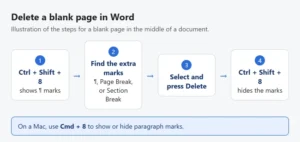
Deleting a page in Microsoft Word might seem tricky at first, but it’s actually pretty simple. If you’ve got a blank page or an extra …
Deleting a page in Word is straightforward. First, place your cursor at the beginning of the page you want to delete. Then press and hold …
To add a hanging indent in Word, first highlight the text you want to format. Then, open the Paragraph dialog box by right-clicking the highlighted …
Creating a fillable PDF in Word is simple and lets you design interactive documents for forms, surveys, or applications. You’ll start by setting up your …
Converting a PDF file to a Word document is a straightforward process. You can do it using online tools, desktop software, or even some built-in …
Making labels in Microsoft Word is a breeze. You start by opening Word, then navigate to the Mailings tab. Click Labels, enter your information, and …
Adding bullet points in Microsoft Word is a breeze and can help organize your thoughts or lists effortlessly. Simply highlight the text you want to …
Adding line numbers in Word is a handy way to keep track of your document’s text, especially for academic papers or legal documents. You can …
Creating two columns in a Word document can make your text look professional, improve readability, and help organize information. To achieve this, you just need …